
Authorization scope changes
A new plan, formulary, product, servicing location, benefit lane, or renewal date can make an earlier approval incomplete for the current case.
Rheumatology revenue cycle automation
Connect biologic authorization, infusion coding, claim review, denial follow-up, and payment posting without hiding the clinical and financial decisions that still require your team.


The administrative problem
A visible authorization status is not enough. Teams need the requested product, provider, setting, quantity or visit basis, effective span, source evidence, open conditions, and current owner to travel together from access work into the claim.
A new plan, formulary, product, servicing location, benefit lane, or renewal date can make an earlier approval incomplete for the current case.
Payer questions may depend on signed notes, prior-therapy history, lab records, screening documentation, orders, and earlier submissions that carry different dates and owners.
Medical benefit, pharmacy benefit, specialty pharmacy, buy-and-bill, and site-of-care instructions can create separate administrative dependencies for one biologic.
Authorization details, coded units, claim lines, payer responses, and remittance outcomes often reach different queues unless each handoff carries the same case version.
End-to-end revenue workflow
Each module contributes a distinct status and review point. The workflow keeps those facts connected without treating eligibility, authorization, coding, claim acceptance, or payment as the same decision.
Confirm the current coverage context and route unresolved benefit details before treatment or billing work advances.
Organize the request version, payer questions, source evidence, acknowledgements, response scope, and renewal dates.
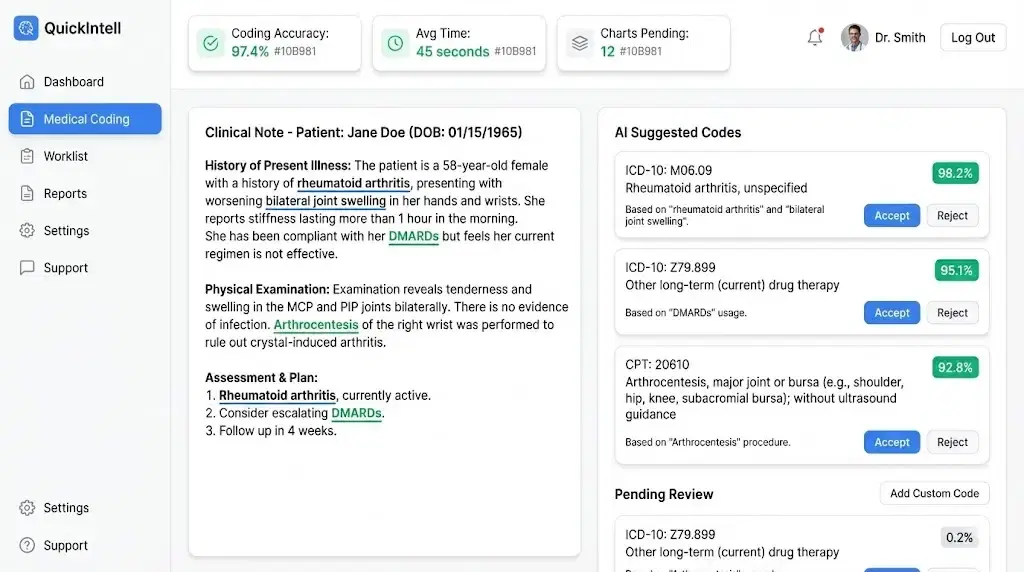
Present diagnosis, CPT and HCPCS suggestions, J-code units, modifiers, and scrub findings for qualified review.
Build and review the payer-ready claim while carrying forward authorization and coding exceptions.
Surface eligibility, authorization, coding, medical-necessity, bundling, and filing risks before submission.
Turn payer denials into owned cases that can route to coding correction, appeal review, follow-up, or closure.
Match remittance lines to claims and route unmatched payments, denials, underpayments, and reconciliation exceptions.
Review authorization, claim, denial, payment, and queue trends with drill-downs to the underlying records.
EHR Integration can supply configured patient, encounter, coverage, note, and charge context and write selected authorization, coding, claim, and payment results back to the source system.
Biologic authorization workflow
QuickIntell organizes the administrative record around the current request instead of asking staff to reconstruct it across an EHR, payer portal, fax queue, and renewal spreadsheet.

The software can retrieve approved records, compare versions, draft administrative work, and monitor change. Clinicians still choose therapy and interpret clinical evidence; authorization staff, coders, billers, and payer representatives retain their respective decisions.
View Detailed WorkflowReview and escalation
Low-confidence, conflicting, incomplete, or changed information should stay visible as an exception. The workflow retains the last verified state, identifies the unresolved question, and assigns it to the appropriate reviewer.

Clinicians and pharmacists choose therapy, interpret disease and laboratory evidence, answer payer clinical questions, and approve clinical statements.
Authorized staff confirm the current plan and request, resolve evidence gaps, approve disclosure, release submissions, and act on payer responses.
Qualified team members review suggested codes, units, modifiers, claim findings, overrides, denial actions, and posting exceptions before final action.
Administrators validate field mappings, resolve sync conflicts, assign permissions, and choose whether a workflow automates, drafts, notifies, or pauses.


Integrations and data flow
EHR Integration can move configured patient, appointment, coverage, note, and charge data into QuickIntell and return approved operational results to the source system. Available resources, mappings, and write-backs are confirmed during implementation.
Field mappings and sync logs preserve where coverage, encounters, notes, charges, and identifiers came from; conflicts stay in a review queue instead of being silently overwritten.
Coverage and authorization status can inform coding and claim review; finalized claim and remittance events can route into denial and payment work without rebuilding the case from email or spreadsheets.
Write-backs can surface configured authorization, coding, claim, and payment results in the EHR, while Analytics provides read-only drill-downs to source claims, encounters, and remittance lines.
Implementation
Scope and timing depend on the EHR, payer mix, interfaces, modules, and workflow variation. A useful rollout proves the handoffs and exception paths before it expands automation.
Document payer channels, biologic and infusion queues, renewal triggers, denial handoffs, role owners, and the systems where each source lives.
Confirm EHR resources, field mappings, payer pathways, module boundaries, role permissions, and which steps notify, draft, pause, or require approval.
Use representative cases to validate source provenance, product and unit fields, payer acknowledgements, write-backs, conflicts, and downtime procedures.
Start with an agreed cohort, review audit records and queue outcomes with users, then expand only after owners accept the configured workflow.

Operational value
QuickIntell is designed to make administrative state and exceptions usable across access, coding, billing, and payment teams. Results depend on configuration, source quality, payer behavior, and staff follow-through.
See the coverage context, request version, source records, payer events, edits, and downstream status without flattening them into one generic flag.
Track the stated authorization span, internal lead time, evidence refresh, unresolved dependency, and person responsible for the next step.
Bring eligibility, authorization scope, diagnosis support, CPT and HCPCS codes, units, modifiers, and service details into the review queue.
Show where a clinician, pharmacist, authorization specialist, coder, biller, integration owner, or payer representative must decide.
Carry unresolved product, site, benefit, coding, acknowledgement, and payment questions forward with their source and accountable team.
Match posting outcomes to claims, route denials and underpayments to the right queue, and return outcomes to operational reporting.
Trust and governance
Rheumatology billing workflows touch clinical records, payer responses, codes, claims, and payments. QuickIntell pairs organization-level data isolation with access controls, audit history, and configurable human gates for those workflows.
Product workflows support encryption for protected data in transit and at rest, with credentials stored separately from operational records.
Organizations can separate who may read, write, approve, export, or administer revenue cycle records and settings.
Audit records preserve the actor, action, time, and affected record so teams can investigate changes, overrides, submissions, and access.
Administrators can require a human checkpoint, run a pilot, notify only, or disable an automation path when risk or source quality calls for it.

Evaluation questions
Practical answers for biologic authorization, infusion billing, human review, integrations, implementation, and security.
Rheumatology billing software should connect patient coverage, biologic authorization, infusion and office-visit coding, claim review, denial follow-up, remittance posting, and operational reporting. It should also preserve the request version and human owner at each handoff rather than reducing the case to a single approved or denied status.
QuickIntell can maintain the current payer and plan context, benefit lane, requested product, provider and setting, payer questions, source-linked evidence, submission events, returned authorization scope, renewal triggers, and unresolved handoffs. A payer or formulary change can reopen the affected checks without silently rewriting the earlier record.
QuickIntell can place authorization scope, diagnosis support, CPT and HCPCS codes, J-code units, modifiers, service dates, and payer-specific findings into coding and claim-review workspaces. Qualified coders and billers remain responsible for final code, unit, modifier, and claim decisions.
Clinicians choose therapy, interpret clinical and laboratory evidence, and establish medical necessity. Authorization staff approve releases and disclosures; coders and billers decide final codes and claims; payment teams resolve posting exceptions; administrators govern mappings and permissions; payers make coverage and authorization determinations.
QuickIntell EHR Integration can be configured to receive approved patient, appointment, coverage, note, and charge resources and return selected eligibility, authorization, coding, claim, and payment results. The implementation team confirms supported resources, authentication, field mappings, conflict handling, write-backs, and downtime procedures for the specific environment.
Implementation typically starts with workflow and system discovery, then data and permission mapping, configuration, representative-case testing, staff review, and a controlled rollout. Scope and timing depend on the EHR, payer channels, modules, source quality, workflow variation, and the approvals required by the organization.
QuickIntell supports encrypted data handling in transit and at rest, organization-level data isolation, role-scoped permissions, audit records, and configurable automation boundaries. Healthcare organizations should review their intended data flow, access model, retention needs, and contractual requirements with QuickIntell during implementation.
Plan your workflow review
A focused discovery session can define the source data, module handoffs, human checkpoints, integration scope, and success measures needed for a practical pilot.
Choose an initial biologic request, renewal, payer switch, infusion claim, or denial that shows where work stalls today.
List the EHR, clearinghouse, portals, fax or phone steps, specialty-pharmacy handoffs, and reports involved.
Identify who verifies coverage, answers clinical questions, releases requests, reviews codes, submits claims, and resolves payment exceptions.

CMS coding and coverage reference
In the CMS NCCI practitioner and ASC procedure-to-procedure table, version v323r0 (2026 Q4), 26 codes in the rheumatology ranges listed below are column one in 2,635 active pairs, and 90% of those pairs carry modifier indicator 1, so an NCCI-associated modifier can bypass the edit when the record supports a distinct service. The hospital outpatient table holds 2,644 pairs for the same codes. The 2026 Q4 practitioner Medically Unlikely Edit table sets a value for 26 codes in these ranges, all of them applied per date of service, and 10 of the values allow a single unit. 8 codes in the ranges are add-on codes that must be billed with a primary procedure. The most frequent edit rationale is “Standards of medical/surgical practice” (898 pairs).
Code ranges counted: 20550-20553 (tendon, ligament and trigger point injections); 20600-20611 (arthrocentesis and joint injections); 96360-96379 (hydration, infusions and injections). The ranges are our selection of where rheumatology services sit in the code set, not a CMS classification.
Arthrocentesis (20600-20611) is one unit per joint however many of its bursae are aspirated or injected, and it is not added to an open or arthroscopic procedure on the same joint. A single initial infusion code applies per encounter unless separate intravenous sites are needed, and hydration given at the same time as another drug is not separately reportable.
Each code is the column-two code in this many active practitioner pairs whose column-one code is also in the ranges. Open one in the NCCI checker to see its pairs and modifier indicators.
No national coverage determination is linked for this specialty. The NCD guide explains how the national policies bind every contractor.
Sources: CMS Medicare NCCI Policy Manual (2026 edition) and the quarterly NCCI procedure-to-procedure, Medically Unlikely Edit and add-on code files, edit version v323r0 (2026 Q4) effective 2026-10-01; counts computed by QuickIntell from those files, see the methodology. CPT codes are shown as numbers only; CPT is a registered trademark of the American Medical Association. A summary for orientation, not billing or legal advice: check the CMS text and your Medicare Administrative Contractor before you code.