Front-End RCM

Patient Eligibility Verification Software

Prepare coverage inquiries from your schedule, review the returned benefits, and assign unresolved questions before the visit. Keep the response, service date, and next action together so patient access and billing teams can follow up.

Coverage and benefits worklistsHuman review for exceptionsPayer and EHR scope validation

Compare your own baseline, payer mix, and completed work during evaluation.

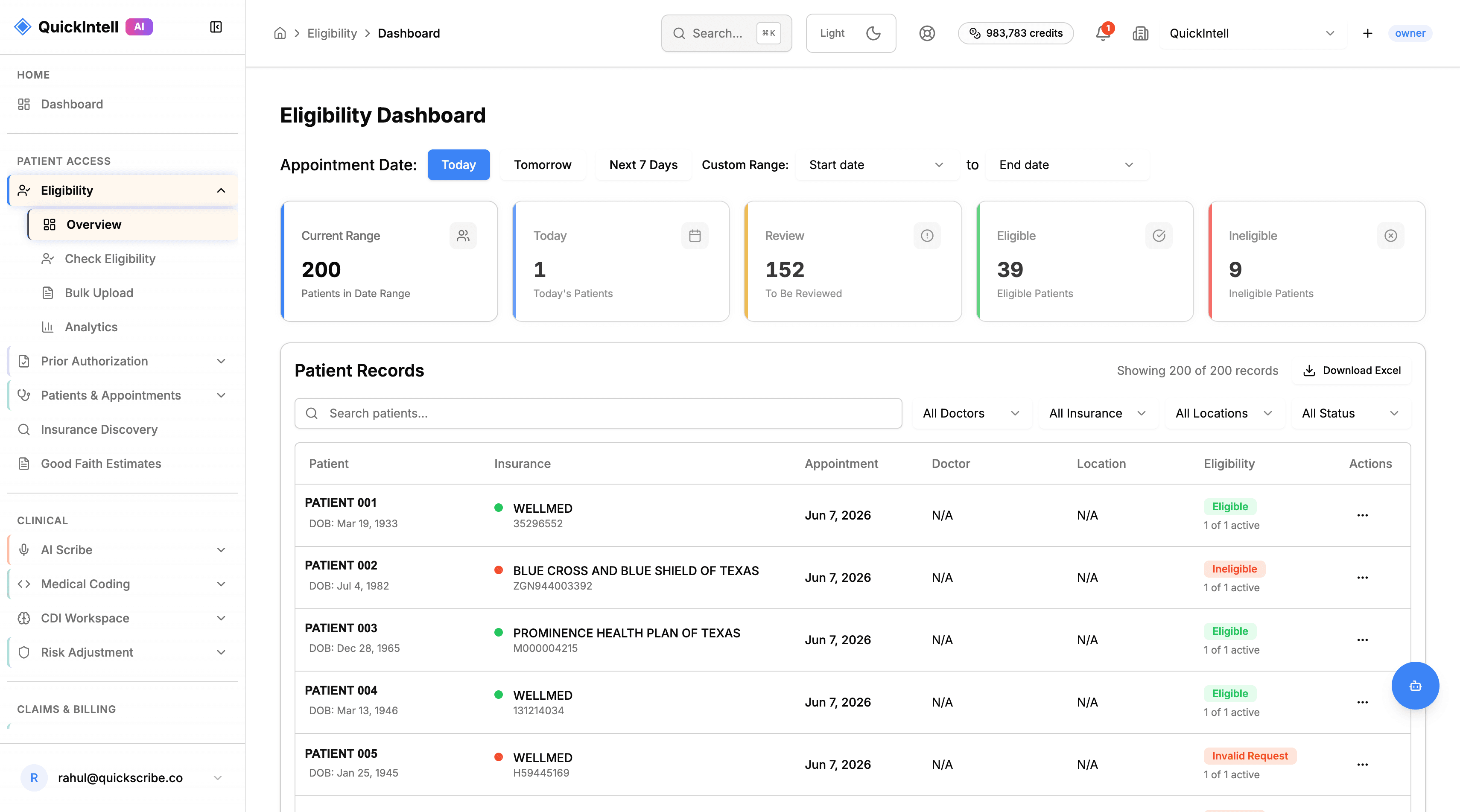
Eligibility Dashboard with appointment-date filters, review and coverage-status summaries, and an eligibility worklist.

Workflow illustration. Request a product demo to review payer responses and exception handling.

Patient-access coordinator helping a patient at a clinic desk

What is real-time patient eligibility verification?

Eligibility verification checks a patient's health plan coverage and benefits for the relevant date of service. The electronic 270 inquiry requests eligibility and benefit information; the 271 response returns the plan's information. Responses can include deductibles, copays, coinsurance and coverage details for specific service types. See the CMS explanation of eligibility and benefit transactions.

For Medicare, CMS describes HETS eligibility data as supporting claim preparation and assessment of beneficiary liability. Its companion guide cautions that a response does not guarantee payment. Read the Medicare eligibility inquiry overview and the HETS companion guide (PDF).

In QuickIntell's documented workflow, staff confirm the patient and service date, review the returned coverage and benefit details, and assign unresolved exceptions before the downstream handoff. A failed check is not proof of inactive coverage. Follow the eligibility workflow and exception checklist.

Definition sources checked: . CMS describes the transaction, not QuickIntell's performance or a universal eligibility-related denial rate.

Trust posture

Review Data Access Before Enabling Inquiries

Review the data flow, hosting, credentials, permissions, retained inquiry records, and applicable agreements for the proposed deployment with your privacy and security teams.

Review security
  • Confirm applicable data agreements
  • Review hosting and credential handling
  • Validate user permissions
  • Inspect inquiry and response records
  • Agree on retention and escalation

Review these systems and inquiry routes against your actual deployment. Names identify evaluation context; they do not establish connectivity or endorsement.

Epic
Oracle Health
athenahealth
eClinicalWorks
NextGen
Greenway
Availity
Stedi

Why Choose QuickIntell for Eligibility Verification?

Outcome metrics are reported by QuickRCM customers using automated eligibility workflows.

Pre-visit Worklists

Organize checks from the appointment schedule and assign missing or conflicting information.

Coverage Exception Review

Review inactive, stale, rejected, or unavailable responses with the responsible team.

Payer Route Validation

Confirm the inquiry, payer route, access permissions, and response fields for your scope.

Benefit Information Handoff

Record the returned benefit information and unresolved questions for patient access staff.

Comprehensive Eligibility Verification Features

Everything you need to verify patient coverage accurately and efficiently

Eligibility outcomes route directly to Insurance Discovery when inactive coverage should auto-queue self-pay review, Patient AR for copay and deductible quoting, Good Faith Estimate workflows for No Surprises Act documentation, QuickAuth for auth flags, and Claims with a verified payer ID.

Real-Time Verification

  • Eligibility inquiries through configured transaction routes
  • FHIR Coverage/Eligibility support
  • Medicare, Medicaid & commercial payers
  • Automatic payer-specific routing

Batch Pre-Visit Checks

  • Schedule-driven T-72h/T-24h/day-of checks
  • Delta highlighting for coverage changes
  • Exception queue with payer guidance
  • Bulk re-verification workflows

ML Benefit Parsing

  • Copay, coinsurance, deductible extraction
  • Plan limits and visit caps
  • PCP required & referral flags
  • Human-readable benefit summaries

Integration Ready

  • EHR and schedule interface validation
  • Clearinghouse integrations
  • Webhook & API support
  • Auto-attach proof to claims

Denial dispute proof

Coverage History Timeline + Historical Eligibility

When a payer denies a claim for no coverage, billing teams can request the relevant historical service date where supported, retain the payer response, and review it with the claim record before deciding on reprocessing or an appeal.

  1. 1Select the patient and disputed service date.
  2. 2Run the historical eligibility check against the payer.
  3. 3Retain the response for reviewer assessment and any supported claim follow-up.

How Eligibility Verification Works

1

Connect

Integrate with your EHR/PMS and configure payer connections

2

Verify

Run individual or batch inquiries through the configured payer routes

3

Parse

AI extracts copays, deductibles, and coverage details

4

Act

Collect accurate POS payments and submit clean claims

Eligibility response states

Status states you will see

Patient-access coordinator helping a patient at a clinic desk
ACTIVE

Coverage is in effect for the service date.

INACTIVE

Plan has ended or is not in effect for this date.

PENDING

Check was started but no answer has returned yet.

ERROR

Transport problem, payer down, or both vendors failed.

STALE

Last check is older than the configured freshness window.

OVERRIDE

Front-desk staff manually verified despite a missing or failed check.

Source: QuickRCM User Manual section 01, Status & state reference.

Who Uses QuickIntell Eligibility Verification?

Physician Practices

Front desk teams review coverage and benefits, record patient questions, and route unresolved checks before the visit.

Hospitals & Health Systems

Schedule-based worklists for coverage review, with assigned owners for incomplete or conflicting responses.

RCM Companies

Validate inquiry access, reporting, and the handoff between your verification staff and client practices.

MSOs & ACOs

Coordinate eligibility across tenants with isolated data, central operations queues, and attribution-ready coverage signals.

Frequently Asked Questions

What status states will I see?

The workflow distinguishes pending, active, inactive, error, stale, and manually overridden checks. Review the payer response and service date behind the displayed state. Assign missing or conflicting information to an owner, and document the reason and evidence for any override.

What happens when an inquiry route is unavailable?

The check remains unresolved until a usable response or documented manual verification is obtained. Define retries, alerts, and the staff fallback for your workflow. Demonstrate the failure path in evaluation rather than assuming every payer always responds.

Can I check coverage for a past service date?

Use the relevant service date when the payer and transaction support historical inquiries. Save the response and its date for investigation. Availability varies, and a response does not determine the outcome of an appeal or establish final payment.

What security and data agreements should we review?

Request deployment-specific data flows, hosting, access controls, credential handling, audit records, subprocessors, and applicable business associate agreements. Have your privacy and security teams confirm the evidence for the proposed use before sensitive records are shared.

How should we measure verification turnaround?

Track inquiry submission, response receipt, failed attempts, manual follow-up, and completion for comparable payer groups. Separate electronic response time from the time needed to resolve benefit questions or registration exceptions. No universal response time or staff-time reduction is promised.

Which payers do you support?

Evaluate your actual payer mix and required inquiry types. Confirm the available route, authorized access, service-date handling, and returned fields for each payer. A payer-directory entry or reference count does not establish a working transaction connection.

Do you support batch pre-visit checks?

Schedule-based worklists support pre-visit verification. Define the inquiry windows, freshness rules, changed-coverage review, and exception owners for your workflow. Validate patient and subscriber matching before using a batch.

Can you organize complex benefit responses?

Review the returned coverage dates, patient responsibility, benefit limits, and any other information available for the inquiry. The workflow organizes these fields for staff review. Missing or ambiguous benefits require payer follow-up; coverage, authorization, and final payment are separate determinations.

Will this work with my EHR or practice management system?

Confirm the specific system and version, available schedule and coverage interfaces, vendor permissions, mapping, and write-back scope. Demonstrate representative records, failed matches, and the manual fallback before enabling production changes.

Is this software or a verification service?

This page describes software your team operates. Managed eligibility verification is a separate service engagement defining the agreed questions, patient records, payer follow-up, customer responsibilities, reporting, and escalation. Request a service assessment for that delivery scope.

How are rollout and pricing established?

Request a quotation for the payer and transaction scope, usage, system interfaces, configuration, training, and support. Agree on a representative validation set, exception handling, and acceptance criteria before launch. Confirm all fees and exclusions in the proposal.
Eligibility Workflow Checklist

Review patient and subscriber details, payer and service date, returned benefits, separate authorization requirements, unresolved questions, and the handoff owner. Adapt the worksheet to your organization’s process before use.

Operational draft for workflow review; no clinical or payer-specific approval is implied.

Discuss your eligibility workflow

Review stale checks, incomplete responses, historical coverage evidence, and the handoff to your scheduling or billing team.

Do not include patient, claim or sensitive document details. This is a one-time inquiry, not a newsletter subscription. See our privacy policy.

You can also contact our team or email info@quickintell.com.

Ready to Streamline Eligibility Verification?

Help your team verify eligibility faster, reduce avoidable denials, and collect with cleaner coverage data.

Patient-access coordinator helping a patient at a clinic desk

Evaluate eligibility verification software for your team

Patient access and billing teams checking coverage and service benefits before the visit.

What to review in a product demo

Run a representative coverage check, inspect the benefit response, and route incomplete or conflicting information to registration. Separate coverage status from service-specific benefits and authorization requirements.

Connections to your current systems

Confirm schedule and demographic intake, payer connectivity, supported responses, and how verification evidence returns to the practice system. Manual follow-up remains part of the exception process when electronic data is incomplete.

Human review and release controls

Staff interpret ambiguous benefits, fix registration details, and make patient counseling or scheduling decisions. An active coverage response does not guarantee payment.

Implementation and validation

Test a sample appointment list across the payer mix. Agree verification windows, benefit questions, exception ownership, and the scheduling handoff before activating broader batch work.

Pricing and quotation

Discuss verification volume, payer mix, integration scope, manual exception handling, support, and the workflow your team will operate.

Coverage checks that support a useful registration handoff

Check the service context

Verify the patient and plan for the intended date and service. An active coverage response is only one input: benefits, network status, authorization requirements, and incomplete information may still require investigation.

Use batch checks and follow-up deliberately

Assess schedule-driven checks alongside individual rechecks when insurance or service details change. Confirm available payer responses and the manual follow-up process for missing, conflicting, or unavailable information.

Return evidence to the right team

Keep the response date, channel, relevant benefit information, unresolved questions, and next action with the work item. Route registration corrections to patient access and clinical or authorization questions to the responsible team.

Validate implementation and reporting

Reconcile a sample against your schedule and existing registration process before expanding. Review incomplete responses, time to resolution, recheck needs, and customer actions separately from payer decision or payment outcomes.

Eligibility and benefits checklist
See it live