Insurance Discovery
Coverage review for self-pay accounts
Review possible coverage matches for self-pay accounts. Verify the result and obtain the required approval before changing an account or resubmitting a claim.
AI Revenue Cycle Management Platform
QuickRCM connects eligibility, authorizations, claim readiness, denials, payment posting, and A/R worklists. Configure automation around your payer routes, available EHR data, and human approval responsibilities.
Start with a defined workflow and compare its results against your current process.
One workspace for revenue cycle operations and review.

AI revenue cycle management applies software assistance to administrative work before and after a healthcare encounter. QuickRCM connects eligibility checks, authorization documentation, claim exceptions, and follow-up through configurable workflows and review queues. The organization defines approval responsibilities and validates payer and EHR connections before enabling changes.
Evaluate claim acceptance, initial denials, manual touches, queue age, and payment timing against your own baseline. Use consistent denominators and comparable payer and specialty groups over an agreed observation period.
QuickRCM is revenue cycle management software for eligibility, prior authorization, claim readiness, submission, denials, payment posting, and accounts receivable worklists. Your team configures which actions run, which need approval, and which remain manual. A product demo should validate your payer mix, EHR data exchange, exception queues, and reporting. Managed RCM is a separate service engagement.
Even with a strong in-house or outsourced billing team, revenue slips through cracks at every stage of the revenue cycle in healthcare.
Every manual step adds delay, cost, and risk. Revenue leaks through the cracks.
QuickRCM connects revenue cycle worklists with configured automation and staff review. Scope the required PMS/EHR data and payer access before enabling each workflow:
Your team sets approval responsibilities and monitors unresolved exceptions.
Whether you're a small practice or a large organization, this AI RCM platform scales with you
Get enterprise-grade RCM automation without needing a large billing team.
Free your staff from repetitive portal logins and manual data entry.
Faster claims submission and payment posting means faster cash collection.
Begin with one or two modules (e.g., eligibility + coding) and expand as needed.
Consistent RCM processes and workflows across all your facilities.
Compare task volume and exception workload before deciding how to expand.
Real-time dashboards show exactly where revenue is and where it's stuck.
Review preventable denial reasons and claim exceptions before submission.
Check missing information, authorization references, and configured payer edits before release.
Configure approval requirements for authorization and claim actions.
Validate specialty requirements and configured rules with your billing team.
Prioritize unresolved claims using status checks, queue age, and assigned follow-up.
Offer cutting-edge AI RCM automation to your customer base.
Reduce operational costs while improving service quality for clients.
Stand out with autonomous RCM capabilities that competitors can't match.
Handle growing client volumes without proportional cost increases.
From pre-visit eligibility to denial prevention — one AI RCM platform handles end-to-end revenue cycle automation
QuickRCM continuously ingests your scheduling data from the PMS/EHR and creates pre-visit tasks for every upcoming encounter. Verifies coverage, handles Coordination of Benefits, confirms PCP requirements, pulls co-pay/coinsurance/deductible details, and flags plan limitations before the patient arrives.
Explore eligibility automationAutomatically screens encounters for services requiring prior auth based on CPT/HCPCS codes, diagnosis codes, and specialty/payer rules. Submits auth requests via payer APIs, uses AI voice agents for IVR systems, and automates portal submissions. Tracks auth IDs, effective dates, and approval states.
See QuickAuth prior authReads encounter documentation (provider notes, problem lists, orders, procedures, medications, imaging) and suggests ICD-10-CM, CPT, HCPCS, DRG, NDC, and revenue codes. Applies specialty-specific rules and payer-specific modifiers. Powerful scrubber validates code combinations, catches missing modifiers, prevents claims with missing auth numbers, and enforces payer/location-specific rules.
See QuickCode AI codingFormats and submits claims through direct payer connections or your existing clearinghouse. Automatically runs regular claim status checks via APIs or EDI 276/277, uses AI voice agents for payors without robust electronic status, detects no-response/pending/rejected claims, and prioritizes follow-up by age, dollar amount, and likelihood of recovery.
Explore claims automationWhen ERAs/EOBs arrive, QuickRCM auto-posts payments at line-item level, routes contractual adjustments and write-offs according to your configured review rules, updates patient responsibility and pushes balances back to your PMS or patient engagement tools. With fee schedules or historical patterns, flags underpayments and surfaces patterns of systemic underpayment by payer, code, or location.
See payment postingLearns continuously from your historical and live data. Classifies denials by reason, payer, specialty, provider, and service line. Identifies root causes and feeds those insights back upstream into eligibility, coding, and scrubbing rules. Auto-drafts appeal letters with patient, claim, clinical, and policy context. Configurable workflows by denial type and claim value.
Explore denial managementOne platform. One AI RCM Agent. End-to-end revenue cycle automation.
Define the baseline, cohort, evidence, and reviewer before comparing results.
Count accepted initial submissions against all eligible initial submissions. Keep clearinghouse acknowledgments separate from payer adjudication.
Define the claim cohort and initial denial denominator before comparing periods. Review results by payer, specialty, and reason.
Record staff interventions, corrections, and escalations per completed task. Include work that remains outside the platform.
Compare submission-to-payment time and A/R age for equivalent groups. Identify unresolved balances rather than counting them as recovered.
Track open work, blocked tasks, assigned owners, and completion dates. Separate automation attempts from confirmed successful actions.
Review failed connections, ambiguous records, reviewer changes, and overridden recommendations before expanding automation.
Use consistent definitions across the current process and proposed workflow. Separate platform activity from confirmed administrative outcomes.
Review initial denials by payer, specialty, reason, and comparable claim cohort.
Count accepted initial submissions against all eligible initial submissions; distinguish acknowledgment from payer adjudication.
Compare submission-to-payment time and open balances for equivalent groups over the agreed observation period.
Document the data source, definition, exclusions, and reviewer for each measure. Industry benchmarks and demonstration dashboards do not establish QuickRCM customer outcomes.
Review historical denial patterns, NCCI and MUE edits, and configured payer-specific checks before submission. Keep the source and effective context with each finding and route exceptions to the responsible reviewer.
Prepare authorization requests, organize documentation, track payer responses, and route cases for human review.
Convert paper EOB information into an 835 ERA workflow. Review conversion output before passing it to posting.
Explore voice-assisted scheduling and payer communication. Confirm supported languages, consent, and escalation for your workflow.
Review documentation-based coding suggestions and route ambiguous encounters to your coding team. Request a quote for the agreed workflow.
Review the available workflows, input requirements, and approval settings for your deployment

Specialized Capabilities
Evaluate the workflows beyond eligibility and claims that matter to your organization. Confirm the inputs, access, review responsibilities, and included scope for each module.
Coverage review for self-pay accounts
Review possible coverage matches for self-pay accounts. Verify the result and obtain the required approval before changing an account or resubmitting a claim.
Screening and match review
Organize provider and vendor screening results for your compliance team. Confirm source availability, check frequency, match resolution, and review records for your scope.
Estimate preparation and review
Prepare patient estimates and track their delivery. Have the responsible team validate the inputs, applicable requirements, timing, and final estimate before use.
Faster payer responses
Ingests Additional Documentation Requests across payers, assembles the medical record packet, and routes ready-to-send responses for reviewer approval before the deadline.
Friction-free patient payments
Drives statements, payment plans, and Stripe-powered guest checkout — collecting patient balances without forcing logins, app downloads, or call-center transfers.
Conversational RCM copilot
A Claude-powered conversational agent your team can ask plain-English questions about claims, denials, contracts, and payments — with answers grounded in your live data.
Clarity for every clinician
Per-provider dashboards covering documentation quality, coding accuracy, denial drivers, and revenue per encounter — turning RCM data into actionable feedback.
Contract variance review
Compare remit information with applicable contract terms and effective dates. Queue differences for review and confirm entitlement before pursuing recovery.
Review your payer mix and required tasks during evaluation. Availability depends on the specific payer, transaction, access permissions, and configured connection.
Confirm each commercial plan and required transaction
Review regional plan access and portal requirements
Validate program, state, and plan-specific routes
Check administrator, network, and specialty workflow requirements
Where available, QuickRCM uses direct payer APIs for real-time data exchange
Automated portal submissions for payers without robust API support
Bridges legacy gaps using AI voice agents for IVR and live rep interactions
Works with your existing clearinghouse setup or direct EDI connections
Confirm the supported route for each payer and task, and define the manual fallback when a connection or required response is unavailable.
Pipeline Orchestration
QuickRCM connects every revenue cycle step through 20 Automation points — eligibility, prior auth, coding, claims, denials, payment posting, and more. Each step runs in one of four modes you control per payer, per workflow, and per risk tolerance.
The automation point is turned off. Use this setting to exclude a workflow from the pilot or pause it while access or dependencies are resolved. Confirm any billing implications in your agreement.
Example: Pause payment posting during ERA parser maintenance.
The step runs in shadow mode and posts a notification with the recommendation, but never executes the change. Ideal for piloting a new step or building staff trust before activating writes.
Example: Observe proposed appeal actions in Notify only mode until your reviewers approve the validation results.
The step prepares the action and routes it to the Approval Queue for a reviewer to confirm or override. Used for high-dollar claims, novel denial reasons, or any step that just tripped its confidence breaker.
Example: Route claim submissions above $25K through Review before action mode.
The selected action runs under your configured automation rules. Enable it only for workflows your organization has validated, with limits, monitoring, and an exception owner.
Example: Enable automatic eligibility checks for the approved schedule feed and supported payer routes.
Each automation point can be Off, Notify only, Review before action, or Automatic so revenue-cycle leaders can phase in payer, patient, coding, claim, denial, payment, and audit workflows without losing control.
Review the available role-based reports, source data, metric definitions, and exception queues for your deployment.
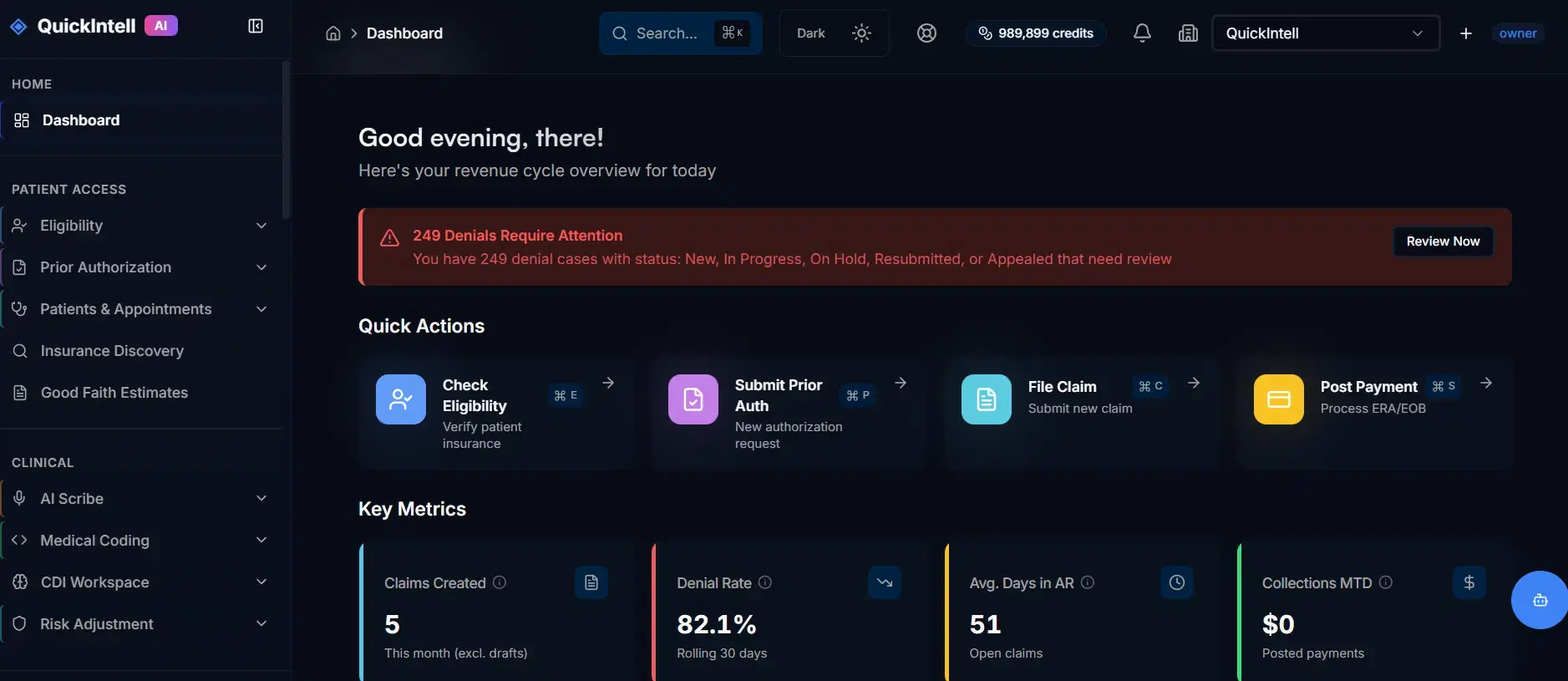
Dashboard illustration; sample values do not represent verified customer results. Confirm metric definitions and available reports for your deployment.
You can drill into root causes for issues like:
"Why is Payer X denying so many imaging claims?"
"Which providers are driving the highest denial rates?"
"Where did Days in A/R actually improve after we turned on automation?"
Export data, plug into BI tools, or use the out-of-the-box views. Either way, you'll finally see your revenue cycle clearly.
Review the safeguards for the proposed deployment with your security team. Confirm access, encryption, audit records, approval controls, retention, and the applicable contractual responsibilities.
Validate records of automated and human actions, data access, exports, retention, and deletion before enabling the agreed workflow.
Everything you need to know about this AI revenue cycle management platform, organized by topic
Search covers every category. Choose a topic to narrow the results.
6 answers in General & High-Level
QuickRCM is revenue cycle management software. It connects eligibility, authorizations, claim readiness, submission, denials, posting, and A/R worklists with configurable automation and approval queues. QuickRCM Managed RCM is a separate service engagement in which QuickIntell operates an agreed scope with human review.
Compare the work each option performs, the tasks your staff retain, the supported system connections, and who owns exceptions. QuickRCM combines software workflows and review controls; a managed service adds delivery responsibilities defined in a separate agreement.
Define the staffing model during evaluation. Staff review ambiguous records, authorize sensitive actions, resolve exceptions, and own clinical or billing decisions. Measure the actual workload before making staffing changes; an automation percentage is not assumed.
The documented workflows include eligibility, authorization preparation and tracking, coding assistance and claim checks, submission and status, denial and appeal worklists, posting, underpayment review, and A/R follow-up. Confirm which modules, interfaces, and actions are included in your deployment.
Practices, groups, and revenue cycle teams can evaluate QuickRCM against their payer mix, specialty requirements, locations, claim volume, and review capacity. Fit should be established through a scoped demonstration and validation rather than an organization-size claim.
Set acceptance criteria from your own baseline. Compare claim acceptance, initial denials, manual touches, queue age, and payment timing for equivalent cohorts. Confirm denominators and exclusions. No customer outcome percentage, cash improvement, or collection increase is promised here.
Our team is here to help. Schedule a personalized demo to see QuickRCM in action.
Book a 30-Min DemoQuickRCM integrates with other AI-powered healthcare solutions for complete revenue cycle automation
The AI medical coding engine used inside QuickRCM for accurate code extraction
AI medical scribe for faster note capture and documentation
AI voice agents for AR calling and prior authorization automation
Explore revenue cycle workflows, administrative handoffs, and evaluation measures
QuickAuth supports authorization preparation, submission tracking, and human review
Want to see what QuickRCM could unlock in your revenue cycle?
We'll review your current workflows and representative sample data, identify required connections and approval responsibilities, and agree on measures for a scoped evaluation.

Practice managers, billing companies, and RCM teams that will operate their own revenue cycle workflows.
Follow an encounter from eligibility and authorization through completed documentation, claim readiness, submission, payment, and follow-up. Review the evidence, responsible queue, and handoff at each step.
Inventory the EHR, practice management system, clearinghouse, payer access, and remittance channels. Confirm supported data and write-back for your specific deployment, along with any file-based fallback.
Set which actions staff approve, which exceptions stay held, and who can release billing changes or write-offs. Automation scope follows the data and review controls agreed during implementation.
Start with a representative payer and encounter sample. Reconcile incoming data and queue ownership, then expand the workflow after the customer validates results.
Discuss software modules, organization size, integrations, users, implementation, and support. A software quote should identify any managed delivery work separately.
Use software when your staff will operate this workflow. Review managed service scope when you want Quickintell to perform the agreed work.
Book a product demo