Adjudicated outcomes
Report payer denials with counts, denominators, and a defined outcome window. Keep transmission rejections separate. Compare cohorts with similar payer, plan, and claim characteristics.
AI RCM · Denial prevention
Bring historical denial patterns and available payer context into a review queue. Assign findings to the right staff, assess corrections, and recheck claims before release. Evaluate the workflow against your claim population in a scoped pilot.
Connect risk review with claim scrubbing, submission, and post-denial management.
Clear definition
AI denial prevention software reviews healthcare claims before they are submitted. It combines deterministic claim edits, payer-policy context, and patterns from prior denials to identify likely rejection or denial risk, explain the reason, route the finding to the right operational owner, and verify the correction through a rescrub. The purpose is to prevent avoidable downstream rework while preserving human review, governance, and auditability.
Claims Submission & Status owns transmission and tracking. Claim scrubbing owns readiness and rechecking. Denial Management owns post-adjudication work. Confirm each handoff and release decision in the proposed implementation.
Pilot measurement
Report payer denials with counts, denominators, and a defined outcome window. Keep transmission rejections separate. Compare cohorts with similar payer, plan, and claim characteristics.
Track findings, staff review, corrections, overrides, and time held before release. Inspect whether the workflow creates useful actions and how unresolved cases are escalated.
Track actual payments and recovery in the agreed cohort after outcomes mature. A risk flag is not a prevented denial, and a corrected claim is not evidence of recovered revenue.
Agree on the baseline, cohort, attribution limits, and acceptance criteria before the pilot. Review both operational burden and downstream results; no improvement percentage is promised.
Download the pilot checklist (CSV)Evidence ledger
Check which sources are available for your claim population, what each finding shows, and how evidence gaps reach a reviewer. Confirm payer and plan scope in the demonstration and proposal.
Source
What the layer contributes to pre-submission review
Past claim and denial outcomes reveal recurring payer, plan, code, modifier, location, provider, authorization, and documentation patterns specific to your organization.
Current CMS coding edits evaluate procedure-to-procedure combinations and units-of-service risk with the correct edit and adjudication context.
Bring available claim-scrubbing findings into the review queue. Confirm which checks are configured, what evidence they return, and how corrected claims are re-evaluated.
Evaluate the relevant payer, plan, product, source, and effective date. Confirm available coverage and gaps for your claim population during the demonstration.
Request a dated coverage scope, sample findings, update responsibilities, and known limitations for the payer, plan, and product you use. Inspect the response and reviewer workflow before relying on an inventory total.
Coding-edit context
Published edit files are an essential input, but safe operations require more than matching a code or quantity. QuickIntell keeps the relevant edit type, effective period, and review path attached to the finding.
PTP edits address code pairs that generally should not be reported together for the same beneficiary on the same date of service. Applicable modifier indicators and CMS policy context matter; a code-pair match is not a substitute for coding review.
MUEs address units of service for a HCPCS/CPT code, provider, beneficiary, and date of service. The MUE Adjudication Indicator helps determine whether the edit is applied by claim line, date of service, or clinical benchmark context. Not all Medicare MUEs are public, so a public file should not be treated as a complete payer-policy inventory.
CMS publishes NCCI edit updates at least quarterly. Production use should account for current files, effective dates, CMS guidance, and the fact that not every payer policy is identical to Medicare policy.
Closed-loop workflow
Deterministic edits run first, payer intelligence and historical patterns add context, and every correction remains connected to the eventual adjudication result.
Map the incoming claim, available authorization context, and historical outcomes to a defined review cohort. Confirm required fields and missing-data handling.
Apply generic claim edits plus NCCI PTP and MUE logic before probabilistic scoring begins.
Check the available payer and plan context against the selected cohort. Route missing or ambiguous matches for review rather than assuming coverage.
Use available historical outcomes to flag recurring patterns. Review the data window, sample coverage, and reasons shown for each risk finding.
Present the available source or historical reason, affected fields, severity, and proposed next action. Staff review the finding before changing the claim.
Send the finding to Coding QA, Prior Auth, CDI, Billing, Patient Access, or Revenue Integrity.
Correct the claim or record an authorized, reason-coded override without losing provenance.
Re-evaluate the corrected claim through the claim-scrubbing workflow. An authorized reviewer releases it to Claims Submission & Status for transmission and tracking.
Link available acknowledgments and adjudicated outcomes to the reviewed claim. Use the resulting evidence to assess patterns and proposed configuration changes.
Operational ownership
Define an accountable queue, review authority, and escalation route for each finding category. Confirm how decisions and unresolved cases remain visible through the release handoff.
Rule provenance and governance
During the demo, inspect the source class, payer and plan scope, available citation or historical reason, version, and affected fields. Identify any evidence gaps.
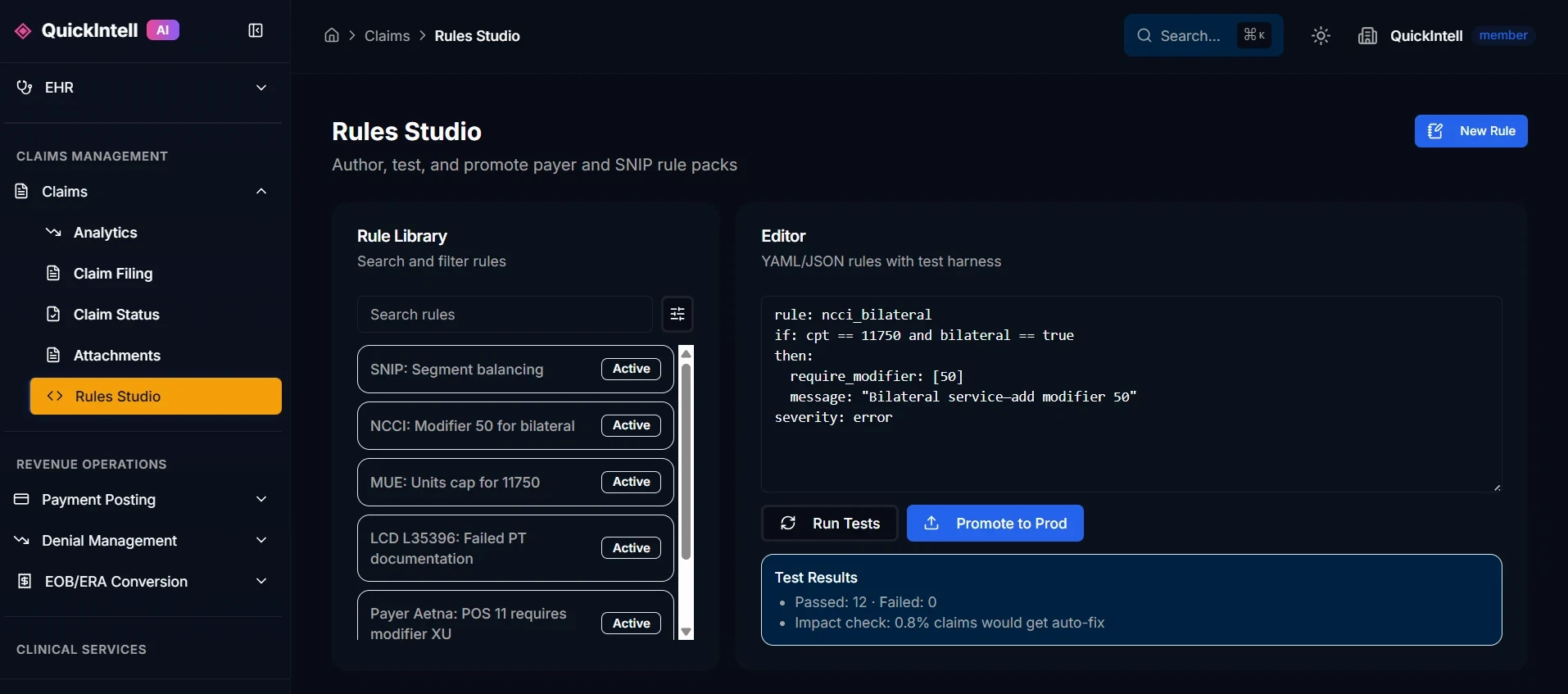
Review the documented Pilot and Enforce modes with warning or blocking actions. Confirm which controls are available in the proposed scope and who may promote a change.
Define reviewer permissions, override reasons, supporting notes, and escalation ownership. Demonstrate how a reviewer decision remains traceable.
Ask to see version history and the rollback procedure. Agree on approval, testing, and monitoring before changing enforcement in a live workflow.
Distinct jobs in the revenue cycle
Keep each workflow’s timing and purpose clear while connecting the evidence between them.
Before release
Before submission
After adjudication
Connected AI RCM workflows
Evaluate denial prevention within QuickRCM or your proposed claims workflow. Confirm the available connection, owner, source evidence, and exception handling for each handoff.
See the QuickRCM suiteResolve coding and documentation findings with the AI coding workflow.
Connect authorization status and scope to the claim before release.
Review readiness findings, recheck corrections, and approve release.
Transmit the released claim and review acknowledgments, rejections, and payer status.
Review post-adjudication cases and link available results to the claim history.
Discuss the available payer and plan scope, source evidence, response contract, and access terms.
Evaluate lab-order medical necessity and frequency risk, then route notice candidates for independent labs, hospital outreach labs, and pathology groups.
Connect denial prevention with the broader Claims & Revenue operating model.
Implementation and commercial scope
Specify claim volume, payer and plan coverage, connectors, reviewer roles, implementation, and support. Confirm included features, usage and third-party charges, exclusions, changes, renewal terms, and support ownership. The schedule depends on access and data readiness.
During procurement, review the proposed deployment and data flow, user permissions, retention, audit access, subprocessors, applicable agreement, and current evidence for any security commitment.
Discuss your pilot scopeFrequently asked questions
AI denial prevention software supports review before a healthcare claim is submitted. The QuickIntell workflow combines available readiness findings, payer context, and historical outcomes to identify recurring risks and route them to staff. Reviewers assess the evidence, correct or override a finding within their authority, and recheck the claim before release. A risk finding is not an adjudication decision.
Claim scrubbing checks whether a claim passes the configured readiness checks and returns findings for correction. Denial prevention focuses on recurring risk patterns and their operational ownership. The workflows can share findings, but the scrubbing owner handles rechecking and release. Evaluate both against the same sample claims rather than assuming every rule or payer is included.
NCCI procedure-to-procedure edits evaluate code pairs that generally should not be reported together unless applicable policy and modifier conditions are met. MUEs evaluate units of service with the relevant date, line or claim context and MUE Adjudication Indicator. QuickIntell preserves the edit source and context for review rather than treating every edit as an automatic denial.
Request a dated scope for your payer, plan, product, claim type, and workflow. Review representative findings, available sources, effective dates, update ownership, and known gaps. An inventory count alone does not establish that a particular claim or policy is covered. Confirm the proposed coverage in the demonstration and written scope.
No. A clean scrub means no configured blocking edit remains in the evaluated context. It does not determine coverage, medical necessity, member eligibility at adjudication, payer acceptance, or reimbursement, and it cannot account for unpublished or newly changed payer behavior.
Assign staff owners for billing, patient access, authorization, clinical documentation, coding QA, and revenue integrity as relevant to your organization. Authorized reviewers assess the finding and record their decision; the release owner confirms that required checks and approvals are complete. Agree on escalation and override permissions before enabling enforcement.
QuickIntell workflow documentation describes Pilot and Enforce modes, warning or blocking actions, and authorized overrides. Ask the team to demonstrate the proposed controls, reviewer permissions, change history, and rollback procedure in your scope. A staged pilot should establish acceptable review burden before a finding is allowed to hold a live claim.
No. Claims Submission & Status handles transmission, acknowledgments, rejection review, and payer status after release. Claim scrubbing handles readiness and rechecking. Denial Management handles cases after adjudication. Denial prevention reviews risk before submission and can use available downstream outcomes for later assessment; an automatic improvement in future results is not assumed.
Request a software inquiry with your payer and plan scope, claim workflow, integration pattern, and governance requirements. Confirm current access, available data, authentication, response contract, update process, limits, and commercial terms with the team. This page does not establish an endpoint contract or universal payer coverage.
Start with a defined claim population, available historical adjudication and denial outcomes, payer and plan identifiers, and the handoff to your current review and submission workflow. Confirm data quality, matching, missing-outcome handling, permitted access, and the proposed connector or file process. Historical data availability affects which patterns can be evaluated; no universal connector or automatic backfill is promised.
Keep the unresolved reason and claim status visible, assign an escalation owner, and apply the agreed hold or exception process. A reviewer should be able to inspect the available evidence and record a correction or authorized override. Confirm who can release the claim and how the decision appears in the audit history during the demo.
Agree on the cohort, access, data mapping, reviewer roles, evidence requirements, and current submission handoff. Validate representative findings, then run a monitored pilot before promoting enforcement. The written implementation plan should identify each owner, acceptance criteria, dependencies, support, and rollback. Timing depends on the proposed scope and data readiness.
Request a written proposal for your claim volume, payer and plan scope, data connection, reviewer workflow, and support needs. Confirm included features, usage and third-party charges, onboarding, change requests, support commitments, renewal, and exclusions. This page does not publish a fixed denial-prevention price or an unlimited-use commitment.
Define baseline and pilot cohorts by payer, plan, claim type, and time window before comparing results. Report counts and denominators for adjudicated claims, keep transmission rejections separate from payer denials, and allow time for outcomes to mature. Track reviewer workload, corrections, overrides, release delays, and subsequent results. Report cash outcomes separately; a flagged risk is not a prevented denial or recovered payment.
Review the proposed deployment, data flow, permitted users, authentication, retention, audit access, subprocessors, incident process, and applicable agreement with the team. Request current evidence for any certification or security commitment used in procurement. General product descriptions do not establish the security terms of a particular deployment.
Ask the team to show a representative finding, its available source or historical reason, payer and plan match, accountable reviewer, correction, override, recheck, and submission handoff. Also inspect an unresolved case, version change, rollback process, and pilot report. Use the downloadable checklist to record evidence, decisions, and gaps without including patient data.
Review the current CMS files and guidance when validating NCCI behavior. QuickIntell product content does not replace official coding policy or professional coding judgment.
Content updated . Official source links do not establish the coverage or validation of a particular QuickIntell deployment.
Protect the claim before it leaves
See how QuickIntell can evaluate your claim mix, route findings to the right teams, and connect pre-submission controls with the rest of AI RCM.