CMS-HCC v28·v22/v24 · ESRD · RxHCC

HCC Coding & Risk Adjustment Software

TL;DR

  • Review proposed findings and supported model configuration with your coding team.
  • Review authorized RAPS/EDPS submission and prepare RADV evidence packets with a traceable review history.
  • Keep clinical questions, held work, quality review, and customer release decisions visible.

Review source documentation and proposed HCC findings with clinical and coding oversight. Inspect MEAT documentation and retain the evidence and reviewer history needed for an agreed audit handoff.

QuickCode supplies the HCC capture pipeline, QuickScribe provides the clinical-note source, Claims carries MA submission data downstream, Revenue Integrity consumes recapture gaps, Analytics monitors RAF KPIs, and QuickEHR writes approved risk data back to the EHR.

Review RAF reportingConfirm model configurationTraceable audit evidence
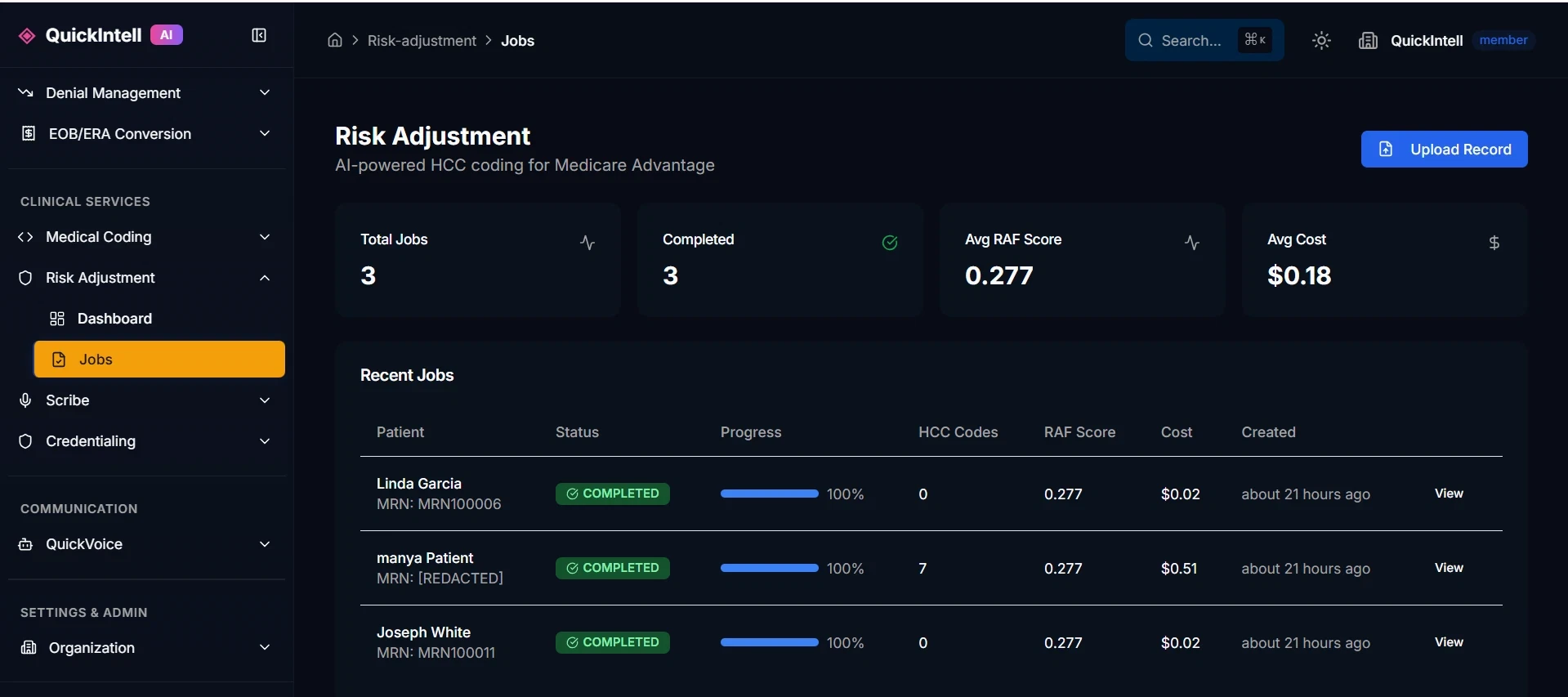
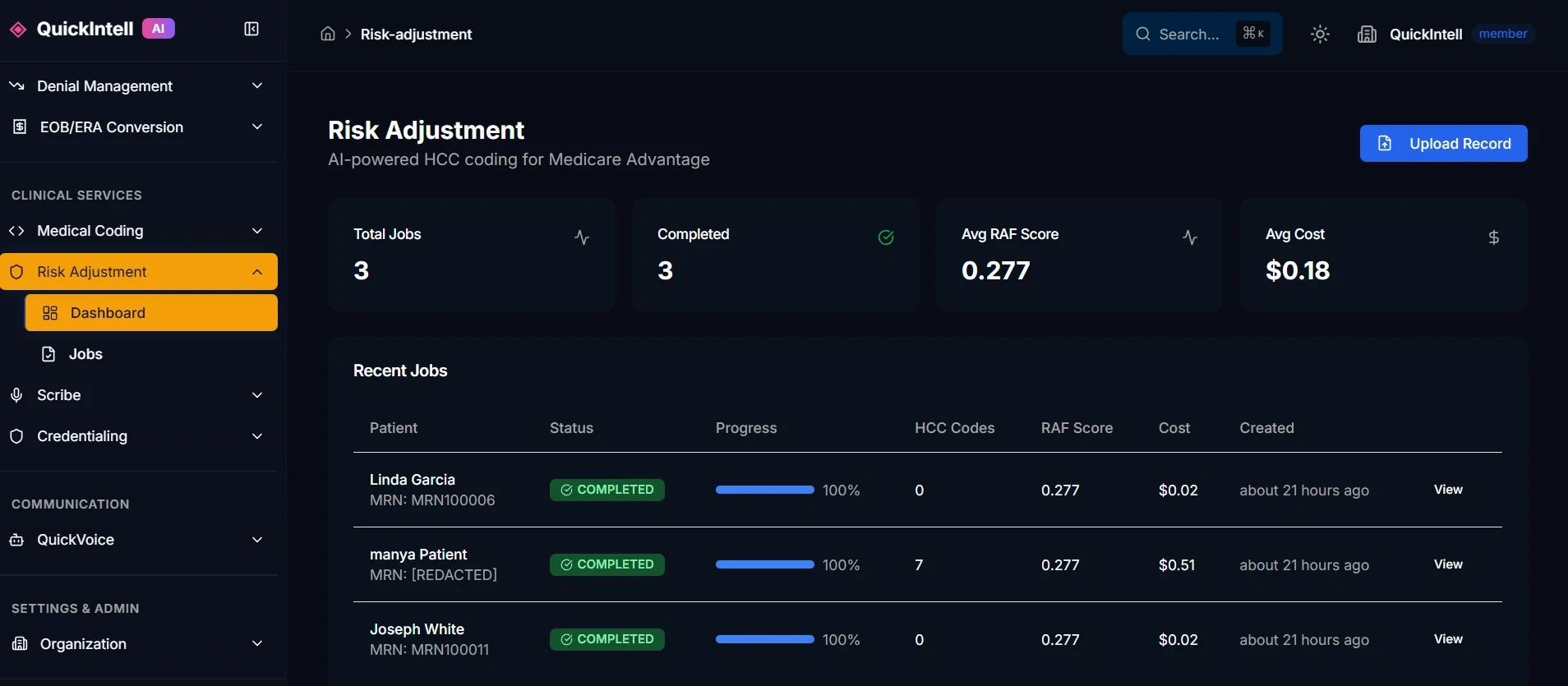
QuickIntell Risk Adjustment — dashboard: RAF score tracking, HCC capture rates, and Medicare Advantage revenue impact.
Medical coder and clinician resolving documentation together
Evidence
Source records

Retain encounter and documentation references for reviewed findings.

Review
Human decisions

Record accept, modify, reject, and clarification decisions.

Context
Program and period

Keep program, service period, payment year, and version context explicit.

Handoff
Release controls

Reconcile reviewed output, held work, and acknowledgment evidence.

Security and audit readiness

Access reviewApproval controlsSecurity evidence reviewAudit handoffs

Why Choose QuickIntell for Risk Adjustment?

Traceable evidence

Keep source records, documentation review, version context, and reviewer decisions together for the agreed audit handoff.

Reviewed findings

Review proposed findings against current documentation and route unresolved clinical questions to the responsible clinician.

Defined review queues

Assign chart readiness, coding review, quality checks, and release responsibilities before expanding the cohort.

Comparable reporting

Define the cohort, review period, denominators, and exclusions before comparing workflow results.

Complete Risk Adjustment Features

Everything you need to optimize HCC capture and maximize RAF scores

QuickIntell Risk Adjustment — batch processing view: large-scale HCC coding jobs, chart review queues, and retrospective Medicare Advantage analysis.
Batch processing — run large-scale retrospective chart reviews and HCC coding across entire patient populations

HCC Identification

  • AI chart review & analysis
  • Suspect condition alerts
  • Diagnosis recapture prompts
  • Clinical evidence mapping

Coding Support

  • HCC code suggestions
  • Specificity recommendations
  • V24/V28 model support
  • Hierarchy optimization

Compliance & Audit

  • Documentation validation
  • Audit trail & evidence
  • RADV preparation tools
  • Coder query workflows

Analytics & Reporting

  • RAF score dashboards
  • Provider scorecards
  • Trend analysis reports
  • Financial impact metrics

Compliance & Audit

Controls that keep HCC capture defensible

MEAT Documentation Validation

Requires Monitor, Evaluate, Assess, or Treat evidence before an HCC is accepted for the payment year.

MCE and Excludes1 Checks

Runs age/sex Medicare Code Editor validation and blocks ICD-10 Excludes1 conflicts before final RAF scoring.

RADV-Ready Audit Chain

Every captured HCC links source encounter -> ICD-10 -> model version -> hierarchy decision -> reviewer ID.

CMS Submission

Submission workflows stay attached to the score

Generate files, submit eligible batches, and keep deadline visibility in the same workflow that finalized the HCC capture.

RAPS/EDPS File Generation

Builds submission-ready files from finalized HCCs, demographics, encounter provenance, and review status.

Direct CMS Submission

Submits eligible batches when enabled and records CMS acknowledgment IDs back onto the submission record.

Submission-Window Calendar

Shows open, upcoming, and closed CMS windows so teams can stage sweeps before deadlines.
Model Coverage

CMS models covered across MA, ESRD, and Part D

Medical coder and clinician resolving documentation together

CMS-HCC v22

Legacy Medicare Advantage payment-year analysis and back-testing.

Segments produced

CommunityInstitutionalNew enrollee

CMS-HCC v24

Concurrent Medicare Advantage scoring and historical comparison.

Segments produced

CommunityInstitutionalNew enrollee

CMS-HCC v28

Medicare Advantage cohorts using the fully phased-in v28 methodology.

Normalization factor: 1.000 PY26.

Segments produced

CommunityInstitutionalNew enrollee

ESRD-HCC v21/v24

End-Stage Renal Disease members, dialysis cohorts, and post-graft reviews.

Segments produced

DialysisPost-graftESRD community/institutional

RxHCC v08

Part D prescription drug benefit scoring, bid support, and reconciliation.

Segments produced

Configured Part DReconciliationNew enrollee

How Risk Adjustment Works

1

Analyze

AI reviews charts and identifies potential HCCs

2

Validate

System maps clinical evidence to support codes

3

Capture

Coders review and confirm compliant diagnoses

4

Monitor

Track RAF improvement and audit readiness

Who Uses QuickIntell Risk Adjustment?

Medicare Advantage Plans

Optimize RAF scores across your member population with prospective and retrospective HCC capture.

ACOs & Value-Based Care

Ensure accurate risk scoring for quality measurement and shared savings calculations.

Provider Organizations

Capture HCCs at the point of care with real-time alerts and documentation support.

Evidence, review, and audit handoffs

Keep program and year context explicit

Establish the program, population, service period, payment year, and supported configuration in the demonstration. Retain that context with each review and export so results from different periods are not treated as interchangeable.

Resolve documentation questions before release

Trace a proposed finding to the source encounter and documentation. Inspect the accept, modify, reject, and clarification workflow, reviewer permissions, and release history. The clinician remains responsible for clinical documentation.

Separate review from submission

Review eligibility of the selected cohort, held records, authorization to release, and available submission channels. Preserve the released output and acknowledgment evidence, and reconcile exceptions rather than treating file generation as acceptance.

Prepare a traceable evidence packet

Ask to inspect source references, review decisions, timestamps, version context, and export access on a representative sample. Agree audit-response responsibilities and reporting. Historical captures require current supporting documentation and review; they are not automatic carry-forwards.

Risk adjustment review services

Frequently Asked Questions

How does AI identify missed HCCs?

QuickIntell analyzes clinical documentation, lab results, medication lists, and historical claims to identify conditions that may qualify as HCCs. The AI surfaces these opportunities with supporting evidence for coder review.

Does this work with both V24 and V28 models?

Yes! We fully support the V28 model, which reached 100% implementation in 2026. Our system also retains V24 model support for historical analysis and calculates RAF scores under both models, highlighting coding differences.

How do you ensure compliance?

Every HCC suggestion includes the clinical evidence required for compliant coding. Our system validates that documentation supports the specificity level coded and maintains complete audit trails for RADV.

Do you support ESRD and RxHCC models?

Yes — ESRD-HCC v21/v24 and RxHCC v08 are first-class.

How fast can you assemble a RADV audit packet?

Agree the packet contents, source access, reviewer history, export format, and delivery timing during evaluation. No fixed turnaround is promised.

Can the system submit RAPS/EDPS files directly to CMS?

Yes — QuickIntell generates the files and submits when the org-level toggle is on, capturing the CMS acknowledgment ID.

How does QuickIntell handle dual-mapped ICD-10 codes (e.g., E11.22)?

Review all mapped HCCs and the hierarchy decisions with source references and the responsible coding reviewer.

Can this integrate with our EMR?

Yes! QuickIntell integrates with Epic, Oracle Health (formerly Cerner), athenahealth, eClinicalWorks, OpenEMR, NextGen, and Allscripts/Veradigm to access clinical data and surface HCC opportunities in real-time during documentation.

What's the typical ROI?

Define the cohort and workflow baseline, then compare review time, unresolved documentation, correction rates, and evidence completeness. No RAF increase or revenue outcome is promised.

Software or a managed review service?

This page covers software your team operates. Risk adjustment coding and documentation review services are a separate engagement with defined review responsibilities, quality checks, customer release authority, and a scoped quote.

Review Your Risk Adjustment Workflow

Scope your documentation inputs, program context, review responsibilities, and evidence handoff in a product demo.