

QuickERA remittance workflow

QuickERA for remittance and payment-posting teams

Evaluate your EOB-to-ERA workflow

Explore remittance intake, document review and EOB conversion for provider organizations and RCM companies. Start with your payer documents, review responsibilities and payment-posting destination.

Use a 30-minute workflow demo to discuss document requirements, exception handling and the checks needed before a posting handoff.

Document intake
Exception review
Posting handoff

Confirm payer-document coverage, receiving-system requirements and reviewer responsibilities before planning an implementation.

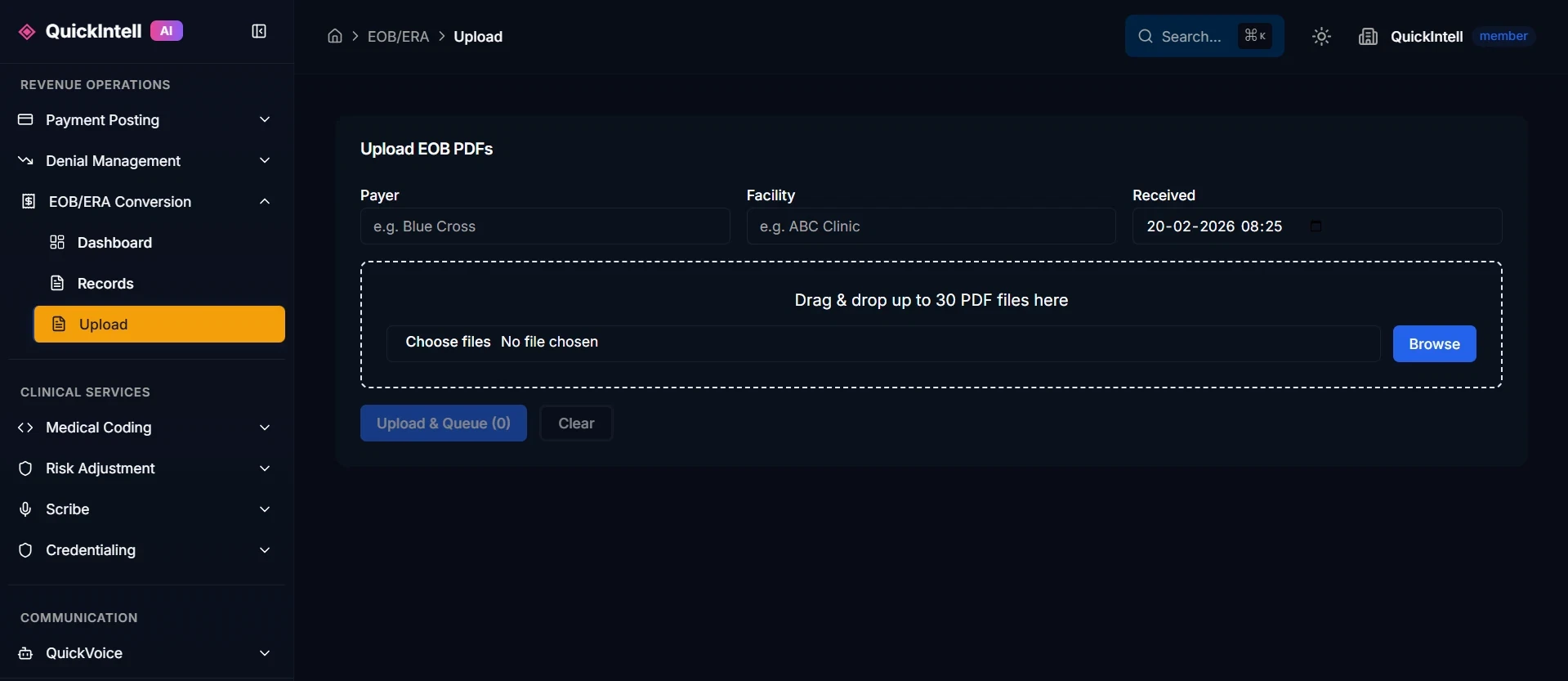
QuickERA EOB upload interface โ€” drag-and-drop file upload for EOB documents, denial letters, and payer correspondence for automated 835 ERA conversion
Revenue-cycle specialist and clinician resolving a billing workflow together

What is the QuickERA platform?

QuickERA brings remittance intake, document review and EOB conversion into a shared workspace for revenue cycle teams. Use the product evaluation to map your payer documents, review responsibilities and the receiving payment-posting workflow. For paper and PDF conversion requirements, explore the EOB-to-ERA conversion workflow and its guides for provider groups, hospitals, Epic handoffs and healthcare lockboxes.

Find the Right Starting Point for EOB Automation

Focus the QuickERA discussion on the payment-posting work your team wants to improve. A clear starting point makes it easier to assess fit and define a useful evaluation.

Where does the work slow down?

  • Identify document formats that require manual sorting or rekeying.
  • Separate time spent on data entry, corrections and reconciliation.
  • List exceptions that interrupt posting or require another team's decision.
  • For RCM companies, note differences in client rules and output destinations.

What should the demo establish?

  • Follow a representative example from the document to the proposed output.
  • Check which steps are supported, which need configuration and which stay manual.
  • Review an exception with the person who would own it in daily operations.
  • Identify receiving-system tests, access approvals and commercial requirements.

Compare the Complete Posting Workflow

Include the document intake, review, import and reconciliation work already handled by your staff and vendors. Ask which responsibilities would change and which would remain. Compare total effort and cost using your baseline and observed evaluation results.

Discuss one priority workflow in a 30-minute demo.

Walk Through Your EOB-to-835 Workflow

Use the demo to follow one workflow from document intake to posting review. Confirm the capabilities and requirements for your payer mix, clients and receiving system at each step.

Revenue-cycle specialist and clinician resolving a billing workflow together
  1. Define the document intake

    Identify the EOB sources, formats, scan quality and batch structure in your workflow. Confirm the intake methods available for the proposed setup and who will approve document access.

  2. Inspect the extracted payment data

    Ask to walk through a representative example, from the source document to the fields your posting team needs. Include missing information and difficult layouts in the evaluation.

  3. Review rules and exceptions

    Explain your payer and client-specific posting rules. Check how a reviewer identifies, corrects and approves an exception, and record any steps that remain manual.

  4. Test the receiving system

    Confirm the receiving system and its import requirements. Validate representative output and posting results in an approved test environment before relying on compatibility.

  5. Reconcile and decide on scope

    Compare source documents, output and posting results against agreed acceptance criteria. Record reviewer effort, unresolved exceptions and dependencies before deciding on the next step.

Make Reconciliation Part of the Evaluation

A demonstration should make the review and acceptance steps clear. These are questions to validate with your team, not a claim that every matching rule or receiving system is supported.

Matching identifiers

Agree on the identifiers needed to associate remittance data with the intended records. Test missing or conflicting identifiers and confirm how unresolved matches are handled.

Amounts and adjustments

Compare line items, totals and adjustments against reviewed source values and receiving-system results. Include the payment scenarios that matter to your team.

Reviewer decisions

Define who investigates differences, approves corrections and authorizes an output to proceed. Ask to see the records available for those decisions in the proposed configuration.

Bring your system name and a non-sensitive workflow description to a 30-minute demo. Agree on an approved review process before sharing documents.

Book a workflow demo
Manual KPIs

Hard Numbers from the Field

Payment posting benchmarks documented in the QuickRCM user manual show where EOB-to-ERA automation changes posting throughput, reconciliation, and cash timing.

>92%

Auto-posting on top-5 payors

Manual benchmark for top-five payors within 90 days.

<1 day

Days to post

Drops from a 3-7 day baseline to overnight posting.

8-12 days

AR-days reduction

Documented first-quarter days-in-AR reduction.

2.5-4%

Net revenue recovery

Silent underpayment recovery legacy systems miss.

<0.5%

Reconciliation variance

Daily cash variance after posting and reconciliation.

4-6 -> <1 hr

Posting hours per 1,000 lines

Staff effort reduction for high-volume remittance posting.

Source: QuickRCM User Manual, section 08 Payment Posting.

Define Value for Your Team

Evaluate QuickERA against your posting workflow, system requirements, and review responsibilities. Use the demo to identify the questions each team needs answered.

Finance leaders

Establish the current cost

Include document handling, posting, review, and correction time in your baseline. Separate staff effort from the time between receipt and posting.

Compare the full cost

Ask about the proposed commercial terms, implementation work, and any receiving-system or third-party charges before calculating a return.

Measure an observed change

Use comparable documents and volumes before and during an evaluation. Keep any projected savings separate from measured results.

Provider and RCM operations

Choose a representative workflow

Include common documents and difficult examples from your payer mix. RCM companies should identify client-specific posting rules and approval responsibilities.

Define the review process

Agree which information needs checking, who handles exceptions, and how unresolved items should be returned to the team.

Check the complete posting journey

Evaluate the output in the intended receiving system and reconcile it with the source. Document manual work that remains.

IT and integration teams

Confirm system requirements

Review the receiving system's import format, required fields, access permissions, and test environment. Confirm compatibility for your specific setup.

Agree on the transfer method

Discuss available connection options and responsibilities with the relevant system owners. Confirm prerequisites before committing to an implementation schedule.

Plan acceptance and handoff

Define validation steps, error handling, and operational ownership. Agree on approval criteria before any production use.

Privacy and compliance teams

Review the proposed data flow

Identify what information would be shared, where it would be processed, and who would have access. Review retention and deletion requirements.

Request applicable evidence

Ask for current documentation supporting the security controls and contractual commitments relevant to your evaluation.

Approve document sharing

Start the demo with non-sensitive workflow context. Agree on the necessary safeguards and agreements before sharing patient information.

Agree on the Measures Before the Evaluation

Compare handling time per document, review and correction effort, import exceptions, and reconciled payment totals against your baseline. Record the sample, time period, and remaining manual steps so your team can judge the result in context.

Use a 30-minute workflow demo to discuss your current process and define the next evaluation step.

Book a workflow demo

Plan Your EOB-to-835 Evaluation

Start with one workflow. These topics help provider organizations and RCM teams assess fit, identify requirements, and define what a successful evaluation would show.

Payer documents

Describe your payer mix, document formats, scan quality, and monthly EOB volume. Confirm which inputs belong in the evaluation.

Receiving system

Identify the PMS, EHR, or clearinghouse that will receive the output. Review its 835 import requirements and access prerequisites.

Review responsibilities

Agree who checks extracted information, resolves exceptions, and approves output before any production posting.

Reconciliation

Define how your team will compare payment totals, adjustments, and claim details with the source EOB and receiving system.

Data handling

Review the proposed data flow, access, retention, and contractual requirements with your privacy and IT teams before sharing patient information.

Success measures

Record current handling time, review effort, and import exceptions. Agree on a representative sample and acceptance criteria before measuring a change.

Bring Workflow Context to the Demo

Your system name, approximate EOB volume, and current posting steps are enough to start the discussion. For RCM companies, include any differences between client workflows. Share non-sensitive context only; discuss an approved process before providing documents containing patient information.

How QuickERA Fits into Your RCM Stack

Everything you need to transform EOB chaos into clean, automated revenue operations with AI EOB-to-ERA automation

๐Ÿ“‹

Intelligent Document Classification

Automatically identifies and separates EOBs, denial letters, appeal responses, adjustment notices, and other payer correspondence. Split mixed PDFs and batches into the right queues so payment posting and denial management both get clean inputs.

๐Ÿ”

AI-Driven EOB Extraction

Layout-aware OCR handles low-quality scans, faxes, rotated images, and multi-column tables. Template-aware parsing for major payors (Medicare, Medicaid, BCBS, UHC, Aetna, Cigna, Molina, etc.). Template-less AI parsing for long-tail and niche payors.

๐Ÿ“Š

Full Service Line Detail Capture

Captures DOS, CPT/HCPCS, modifiers, units, billed/allowed/paid amounts, contractual write-offs, CARC/RARC codes, and free-text remarks. Confidence scores and validation rules ensure low-confidence cases are always routed to review.

โš™๏ธ

Payer-Aware Rules Engine

Configurable rules engine layered from Global โ†’ Payer โ†’ Client โ†’ Facility. Handles payer quirks (coinsurance vs copay labeling, bundles, global fees, capitated services). Custom mapping of payer-specific codes/remarks to standard CARCs/RARCs.

๐Ÿ“ค

X12 835 ERA Generation

Generates standard X12 835 ERAs, plus optional CSV/JSON for analytics and RPA. Configurable ERA batching (one ERA per check, per provider/facility per check, or custom logic). Correctly represents patient/payer responsibility, secondary/tertiary responsibility, write-offs, and adjustments.

โœ…

Exception Queues & Review UI

Side-by-side review UI with original EOB on one side and structured data on the other. Click any value to see exactly where it came from on the EOB. Edit, add lines, or override mappings in seconds. Low-confidence documents and validation failures automatically routed to review.

๐Ÿšจ

Denial Routing & Management

Denial letters are automatically separated and tagged. Routed to denial worklists or external denial management tools. Denial data is structured early so appeals and root-cause analysis can start sooner.

๐Ÿ“ˆ

Analytics & Monitoring

Dashboards show automation %, exceptions, denial patterns, and volume by payer/client. Track trends, identify bottlenecks, and measure ROI. Every correction feeds a learning loop to improve automation over time.

Triangle of Truth

Reconcile every batch across bank deposit, ERA total, and posted total so payment operations can spot mismatches before month-end.

Who QuickERA Is For

โœ“RCM companies & billing vendors
โœ“Multi-specialty provider groups & large clinics
โœ“Hospitals & health systems
โœ“MSOs, ACOs & physician networks
โœ“Clearinghouses & healthtech platforms
โœ“Supports both professional (837P) and institutional (837I) workflows

Part of the Complete AI RCM Platform

QuickERA works seamlessly with other QuickIntell solutions for end-to-end revenue cycle automation

Works With Your Existing Stack

No need to rip and replace. QuickERA integrates seamlessly with your current PMS, clearinghouse, and lockbox vendor.

PMS & EHR Systems

Works with any PMS or EHR. ERAs are generated in standard X12 835 format that your system can ingest just like electronic ERAs from payors.

EpicCernereClinicalWorksAthenahealthNextGenAllscriptsAny X12-compatible system

Clearinghouses

Send ERAs directly to your clearinghouse or through your existing integration. No need to change your clearinghouse vendor.

Change HealthcareAvailityWaystarZirMedAny clearinghouse

RCM Platforms

Integrate with your existing RCM platform or use QuickERA as a standalone solution. APIs available for custom integrations.

Epic ResoluteCerner Revenue CycleAthenahealthCustom RCM platforms

Data Sources

Ingest EOBs and correspondence from multiple sources simultaneously.

SFTPWatched FoldersBank/Lockbox ExportsEmailAPIWebhooks

Flexible Integration Options

๐Ÿ”Œ

SFTP

Secure file transfer for batch processing

๐ŸŒ

REST APIs

Real-time integration via RESTful APIs

๐Ÿ””

Webhooks

Event-driven notifications and callbacks

Bi-directional EHR write-back

Close the loop between ERA automation and the patient chart

QuickERA sends outbound payment results, claim status updates, and posting outcomes back through QuickRCM's EHR Integration layer so billing teams do not have to re-type the same information in the EHR.

FHIR for modern EHRs

For EHRs with modern APIs, QuickERA routes write-back through FHIR or REST adapters with OAuth2 credentials, field mappings, outbound queues, health checks, and sync logs. Providers and front-desk staff see payment and claim updates in the chart without manual CSV exports.

Stagehand for legacy EHRs

When an EHR does not expose FHIR or REST endpoints, QuickERA can use Stagehand browser automation to operate the authorized EHR portal like a trained user, posting the same write-back data through existing screens while preserving audit visibility.

Not sure if QuickERA works with your systems?

Talk to an Integration Specialist

Plan Your Security and Data Review

Include your privacy, security and IT reviewers when defining the EOB-to-835 workflow. Establish the requirements for your proposed setup before sharing patient information.

Data flow and hosting

Map where documents enter, where they are processed and where outputs go. Request the hosting locations and subprocessors for the proposed environment.

Access and review records

Define who can view documents, change mappings, approve outputs and export files. Ask to see the access controls and records available for those actions.

Retention and deletion

Agree on retention periods, deletion procedures, backup handling and responsibilities when the service ends. Review these requirements before transferring documents.

Contracts and supporting evidence

Review applicable agreements and request current security documentation for the product and environment in scope. Confirm what each report or certification covers with your security team.

Start with non-sensitive workflow context

Use a workflow description or synthetic example in the initial discussion. Keep patient information, credentials and confidential documents out of booking and inquiry forms. Agree on an approved transfer method and complete the required reviews before a document evaluation.

Bring your security and integration questions to a 30-minute workflow demo.

Book a workflow demo
QuickERA workflow assessment

Plan your QuickERA workflow

Scope your payer mix, extraction needs and posting handoff with our team. For the conversion steps and acceptance checks, use the EOB-to-ERA conversion overview.

Do not upload or email EOBs or patient details through this public form. Our team will coordinate an approved secure transfer and any required agreements.

Do not include patient, claim or sensitive document details. This is a one-time inquiry, not a newsletter subscription. See our privacy policy.

You can also contact our team or email info@quickintell.com.

Frequently Asked Questions

Questions to help provider and RCM teams evaluate their EOB-to-835 workflow

๐ŸŽฏ

Product Overview

Choose the workflow to evaluate

2 questions

What should we evaluate with QuickERA?

Start with the EOB-to-835 workflow your team wants to improve: document intake, payment data review, output requirements and reconciliation. A workflow demo helps establish which steps fit your requirements and which need further validation.

Who should join the workflow demo?

Provider organizations can include a payment-posting lead and someone familiar with the receiving system. RCM companies can also bring a lead who understands client-specific posting rules and separation requirements. Share a non-sensitive workflow outline when booking.

Still have questions?

Use a 30-minute workflow demo to discuss your document sources, posting system and evaluation requirements.

Share non-sensitive workflow context only. Agree on a secure review process before sending documents.

See where QuickERA fits your posting workflow

A 30-minute demo for provider organizations and RCM teams

Discuss the documents you receive, the work your reviewers handle and the requirements of your posting system. Leave with the next questions to resolve before deciding on a pilot.

Map your inputs

Describe your payer mix, paper or PDF documents and current intake process using non-sensitive examples.

Review the handoff

Discuss your PMS, clearinghouse or posting destination, reviewer responsibilities and exception checks.

Define an evaluation

Agree what to verify, which documents to assess and what a successful handoff would mean for your team.

No patient records are needed to book. Use non-sensitive workflow context in the scheduler or inquiry form. If document review is appropriate, agree on a secure transfer process first.