Compare your shortlist
QuickIntell-published comparisons of product scope and fit. Verify current capabilities and proposals directly with each vendor.
Explore product and workflow pages for AI Scribe, AI Medical Coding, and Denial Prevention. Review the scope and connection requirements for your organization before choosing a workflow to pilot.

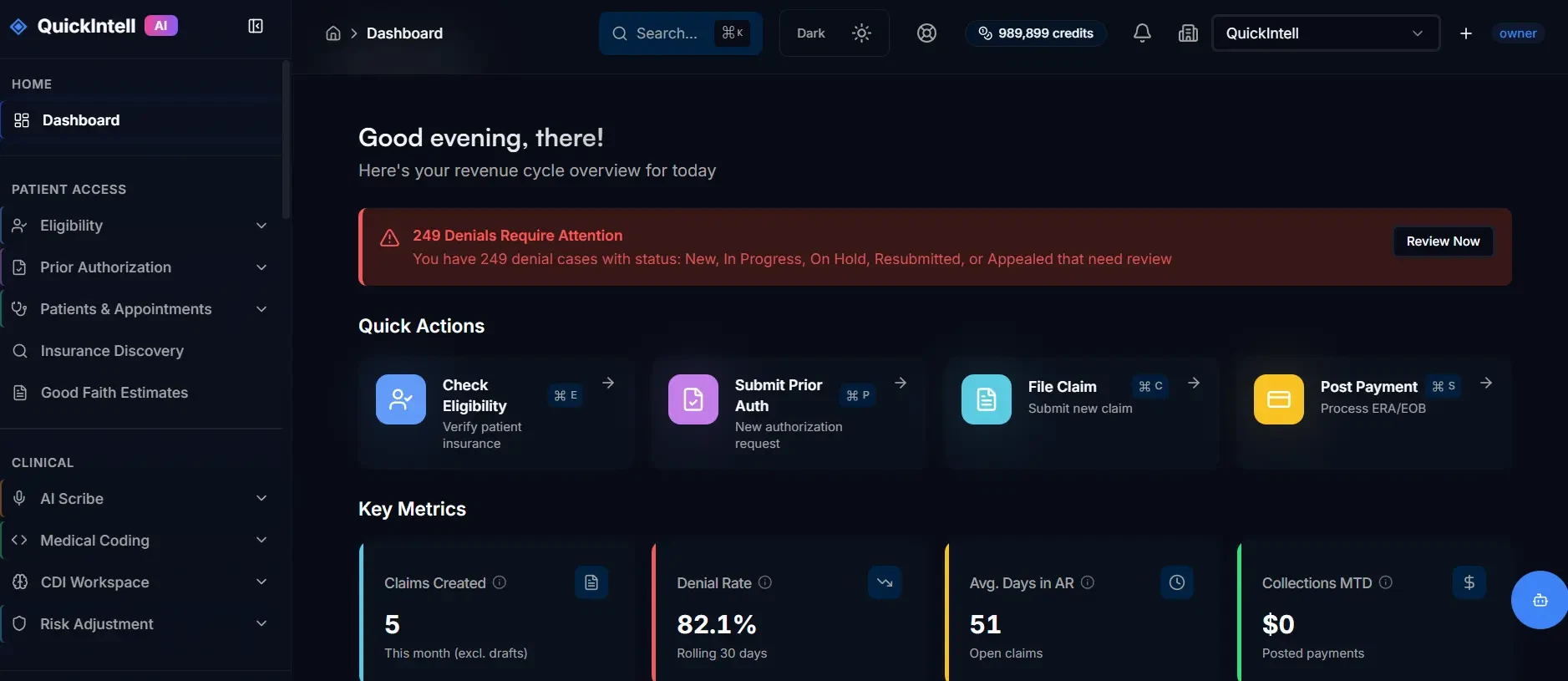
The QuickIntell platform — one unified dashboard for your entire revenue cycle
Identify the task, source data and handoffs you want to evaluate.
Assign approval responsibilities and a process for exceptions.
Confirm EHR, clearinghouse and payer access for the proposed deployment.
Set a baseline, observation period and success criteria for your pilot.
Search by task or browse the revenue-cycle stages. Some workflows are part of a shared platform; each link names the product or guide it opens.
Showing 38 of 38 products and workflows.
Identify active coverage for self-pay and underinsured accounts
Explore Insurance DiscoveryEligibility verification workflows with payer access confirmed during scoping
Explore Eligibility VerificationPrior-authorization preparation, submission workflows and status follow-up
Explore Prior AuthorizationSource-grounded payer rules for authorization, coverage, and pre-bill checks
Explore Payer Intelligence APIGood faith estimates & price transparency compliance
Explore Patient Cost Estimator & Good Faith EstimatesSurface missed billable services before claims are finalized
Explore the QuickRCM platformTrack inbound and outbound referrals through authorization and scheduling
Explore referral and care coordinationAutomated credentialing & payer enrollment
Explore Provider Credentialing & Payer EnrollmentRecord approved RCM workflows and replay them locally on Windows
Explore Cognitive AutomatorAmbient AI clinical documentation in real-time
Explore AI Medical Scribe24/7 patient outreach, scheduling & reminders
Explore QuickVoice workflowsCPT, ICD-10 and HCPCS coding assistance with human review
Explore AI Medical CodingIntelligent EHR workflow automation
Explore AI EHR AssistantBots for Availity, UnitedHealthcare, Medicare, Medicaid and 300 payers with write-back
Explore Payer Portal BotsQueued portal tasks with read-first validation and approval before writes
Explore EHR & Portal AutomationEvent-driven handoffs between modules with limits and circuit breakers
Explore Workflow OrchestrationClaim preparation, validation and electronic submission workflows
Explore Claims FilingPre-submission risk scoring and payer-specific edits
Explore Denial PreventionAI-powered denial work queues, root-cause analysis, and recovery
Explore Denial ManagementGenerate appeal packages with supporting documentation
Explore AppealsAutomated ERA/EOB processing & reconciliation
Explore Payment PostingEOB-to-ERA conversion automation
Explore QuickERAPrioritize aged claims, payer follow-up, and work queues
Explore AR ManagementDetect contract variances, downcoding, and missed reimbursement
Explore contract variance analysisEnd-to-end revenue cycle automation
Explore the QuickRCM platformFull-service RCM at 2.9% of collections with AI agents and human review
Explore Managed RCMAutomate patient balances, statements, and payment plans
Explore accounts receivable workflowsStatement generation, delivery tracking and payment plans for patient balances
Explore Patient StatementsSegment patient outreach, reminders, and soft collections workflows
Explore QuickVoice workflowsSpecialty-tuned coding, edits, and billing workflows
Browse specialty solutionsClinical documentation queries, HCC opportunities and coding-quality review
Explore CDI OptimizationRAF score optimization for Medicare Advantage
Explore HCC Coding & Risk AdjustmentDRG coding & facility billing automation
Explore Hospital Inpatient BillingScreen workforce, vendors, and payers against exclusion workflows
Read the compliance guideCoordinate primary, secondary, and tertiary benefits before billing
Explore Coordination of Benefits (COB)Manage Additional Documentation Requests and payer evidence packets
Explore the QuickRCM platformConfigure no-code workflow agents for payer and RCM tasks
Explore Agent BuilderMonitor revenue cycle performance, leakage, and workflow trends
Explore AI RCM AnalyticsChoose the right starting point
Bring the workflow, systems and handoffs you need to evaluate. We can show the relevant product path and discuss the next implementation step with your provider or RCM team.
One agentic RCM platform for front-end access, clinical documentation, claims, denials, payments, patient balances, and client operations.
Configure payer, portal, and back-office agents around your operating rules.
Compare eligibility, authorization, coding, claims, denials, posting, AR and analytics paths.
Manage clients, permissions, reporting, and workflows in organization-scoped tenants.
Tune automation depth by workflow confidence, payer rules, and team preference.

Both. Teams can launch QuickIntell as a complete AI RCM platform or start with modular products such as eligibility, prior authorization, medical coding, denials, payment posting, or patient AR.
Start with your EHR or practice-management system, version, required workflow and permitted access. We review the available interface options and confirm the supported scope before proposing an implementation. A listed system does not establish compatibility with every module or customer environment.
Bring your current clearinghouse and the transactions you need to support to the workflow review. We assess access, enrollment and routing requirements before agreeing on a supported approach. Keeping the current clearinghouse depends on that assessment.
Suggest mode surfaces recommendations for staff review, Assist mode drafts and prepares work for approval, and Auto mode completes approved high-confidence actions inside configured guardrails.
Security, privacy, audit logging, access controls, and customer-specific compliance evidence are reviewed during procurement and implementation so each organization can validate its requirements.
Yes. QuickIntell is designed for multi-tenant operations with organization-scoped workflows, role-based access, reporting, and client-level configuration.
A phased rollout usually starts with core revenue workflows, then adds clinical documentation, denial management, analytics, and specialty automation as integrations and operating rules are validated.
Teams evaluating QuickIntell vs Waystar usually compare automation scope, AI agent configuration, multi-tenant operations, analytics, and whether they want to keep or change their clearinghouse setup.
See how QuickIntell's AI products can reduce claim denials, automate prior authorizations, and improve coding accuracy for your organization.
Compare the scope you need, then use the buyer's guide to record requirements, costs, and pilot evidence with your team.
QuickIntell-published comparisons of product scope and fit. Verify current capabilities and proposals directly with each vendor.
An eight-page guide with scope, requirements, data-readiness, cost, and pilot-decision worksheets. Evaluation guidance, not a vendor capability attestation or customer-results report.
Download the buyer's guide (PDF, 8 pages)Free download. No email address or subscription required.