Gastroenterology RCM software

Gastroenterology revenue cycle management for complex GI workflows

Connect endoscopy clearance, IBD biologic access, coding review, claims, denials, and payments.

QuickIntell works alongside your current EHR to move financial and clinical context through one reviewed workflow. Repeatable steps can run automatically, while missing documentation, payer exceptions, and low-confidence decisions stay visible to your team.

Patient access

Eligibility Verification and Prior Authorization

Claim readiness

Medical Coding and Denial Prevention review

Submission

Claims validation, release, and status tracking

Post-adjudication

Denial Management and Payment Posting

One path: verify coverage, complete authorizations, review coding, submit claims, work denials, and post payments without hiding the exceptions that need a person.


Gastroenterology team reviewing a revenue cycle workflow
Gastroenterology clinician and patient sharing a warm, attentive moment in a clinic

Trust and interoperability

QuickIntell is built for workflows that handle protected health information. Organization-scoped records, role permissions, audit logs, and protected credentials support accountable access; EHR Integration scope is confirmed before data moves.

  • Role-Based Access Control
  • Organization-scoped data
  • Audit logging
  • FHIR / REST
Review security

Where gastroenterology revenue cycles lose context

GI work crosses the clinic, endoscopy or ASC, pharmacy benefit, payer, clearinghouse, and billing team. When those handoffs live in separate systems, staff have to reconstruct the same case at every step. QuickIntell keeps the status, source context, and next action attached to the work item.

Clearance depends on the planned service

Screening-versus-diagnostic benefits, site-of-care rules, and endoscopy authorization requirements can change the financial-clearance path. IBD biologics add medical-versus- pharmacy benefit routing, prior-therapy evidence, and renewal dates.

Documentation changes claim logic

The planned procedure, final procedure, diagnosis detail, authorization number, and supporting note need to stay aligned. When the record is incomplete or a payer edit fails, the case should pause for a coder or authorization specialist instead of guessing.

Payer outcomes need a feedback loop

Claim status, remittance details, denials, and payment exceptions should create owned follow-up work. The same findings can then inform payer rules and operating views so teams can see whether a recurring issue starts before or after submission.

Clinician reviewing a gastroenterology workflow on a tablet

How gastroenterology RCM moves from schedule to payment

A connected workflow keeps the planned service, coverage, authorization, clinical documentation, coded claim, payer response, and payment outcome linked. Each stage can advance clean work and hold exceptions for the right reviewer.

1. Verify coverage and requirements

Eligibility Verification checks the patient, plan, and benefit response. Prior Authorization then brings the planned service, clinical packet, submission channel, status, and renewal date into one queue.

2. Review clinical and coding context

Medical Coding presents suggested codes and payer-rule findings beside the source note. Missing or ambiguous detail can route to a clarification step before the claim moves forward.

3. Hold or submit the claim

Denial Prevention checks the draft before release. Claims with unresolved failures remain in a review path; cleared claims can be submitted and tracked through payer acknowledgement and adjudication.

4. Post outcomes and route exceptions

Payment Posting matches remittance lines and separates exceptions. Full or partial denials can open work in Denial Management, while Analytics helps teams trace recurring payer and workflow patterns back to the source record.

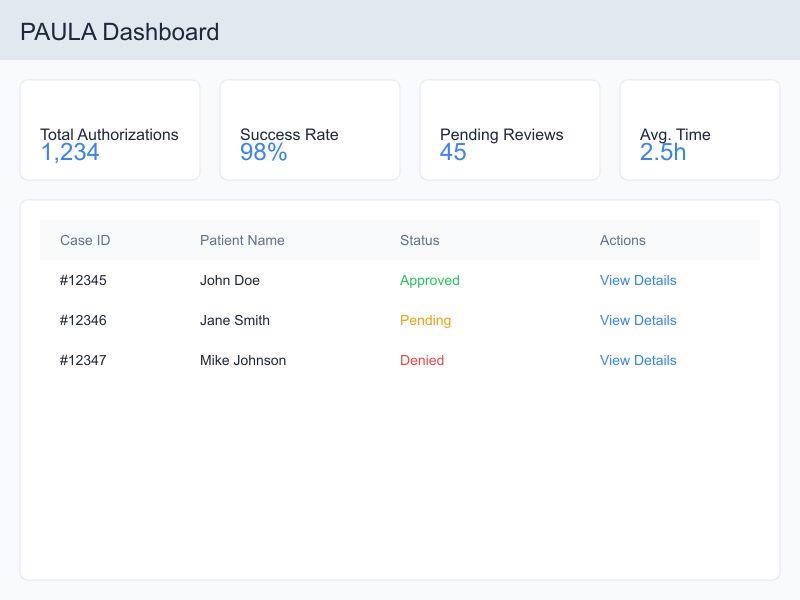
Prior Authorization work queue displayed on a laptop
GI workflow depth

Gastroenterology workflows that need payer-aware review

GI revenue work is not one generic claim path. These workflows keep payer requirements, source documentation, review decisions, and downstream follow-up connected without promising an automatic approval or payment.

Screening vs. diagnostic

Endoscopy financial clearance

Combine active coverage, the planned service, benefit response, authorization need, and site of care so staff can resolve financial-clearance gaps before the procedure.

  • Screening-versus-diagnostic benefit interpretation
  • Endoscopy, capsule, and advanced-procedure authorization status
  • Unresolved payer rules assigned before the procedure
Medical or pharmacy benefit

IBD biologic access and renewal

Track payer requirements, clinical documentation, prior therapies, benefit channel, submission status, and renewal dates for biologic access work.

  • Payer-specific documentation and prior-therapy evidence
  • Benefit channel and site-of-care review
  • Status, renewal, peer-to-peer, and appeal handoffs
Explore the IBD and endoscopy workflow
Documentation to claim

Endoscopy and ASC claim preparation

Carry final procedure detail and coded lines into a reviewed claim path, with payer edits and missing documentation surfaced before release.

  • Coder clarification when final documentation is incomplete
  • Pre-submission checks with unresolved findings held
  • Claim release only after the configured review step
Payer response to next action

Denial and payment follow-up

Use remittance and claim-status detail to route the next task without separating the exception from its original authorization, documentation, and claim context.

  • Full and partial denials routed to owned work queues
  • Coding correction or appeal path kept with the source record
  • Unmatched payment and reconciliation exceptions surfaced
Revenue cycle team reviewing workflow exceptions

Human review is part of the workflow

QuickIntell can assemble context, suggest a next step, and draft work. Your organization decides which steps may advance and which require approval. Reviewers can inspect, edit, reject, or escalate before a consequential action is released.

Source context stays beside the suggestion

Reviewers can compare proposed coding, authorization, or denial work with the underlying note, payer response, and attached documentation. Missing context becomes a question or task rather than an invented answer.

Blockers pause release

Field-validation errors, failed claim checks, missing documents, and low-confidence matches stay visible in a review queue. A qualified user resolves the issue or records a reasoned override, with the action captured in the audit trail.

Escalations retain an owner

Portal interruptions, clinical clarification requests, denied authorizations, claim denials, and payment exceptions can move to a staff, manager, or appeal path with the case history intact.

Implementation starts with your current GI workflow

QuickIntell is configured around the systems, payer channels, facilities, roles, and approval rules you already use. A staged rollout lets your team validate data and decisions before expanding automation.

Gastroenterology clinician and patient sharing a warm, attentive moment in a clinic

1. Map systems, data, and owners

Confirm the source EHR, available FHIR or REST interfaces, payer portals, clearinghouse paths, facilities, required data, write-backs, and the people who own each exception. Browser automation is scoped only where an API path is not available.

2. Validate a representative work set

Test a sample of endoscopy clearances, biologic requests, coded encounters, claims, denials, and remittances. Review field mappings, queue ownership, and write-back behavior while automation remains in a notification or approval mode.

3. Expand with controls and measurement

Set per-payer or per-facility rules, approval thresholds, user permissions, and escalation paths. Increase automation only for validated steps, then use Analytics and source-record drill-down to monitor the operating result.

Prior Authorization dashboard used during a GI workflow review

Bring one GI workflow to the review

Pick endoscopy clearance, a biologic renewal, a recurring claim denial, or a payment exception. We will map the inputs, review points, and integration questions with your team.

Plan an implementation review

Measure the handoffs that matter

Analytics turns workflow status into an operating view. Teams can filter, inspect freshness, and drill from a trend to the underlying claim or encounter. Your organization sets the baseline and target; QuickIntell does not assume a result before implementation.

Pre-service clearance

See scheduled work with incomplete coverage, unresolved authorization requirements, pending documentation, or an approaching renewal date so the owner can act before the service.

Claim readiness

Separate cleared work from claims held for documentation, coding, eligibility, authorization, or payer-rule findings. Reviewers can open the source instead of working from an unexplained score alone.

Denial patterns

Filter denials by payer, reason, provider, facility, and claim type. Drill into representative cases to decide whether the next action belongs in clearance, documentation, coding, correction, or appeal work.

Payment exceptions

Track remittance matching, partial denials, unmatched payments, and reconciliation work. Source-level detail helps teams distinguish a payment-posting issue from an earlier claim or authorization problem.

Gastroenterology care team in a procedure room

A practical fit check for GI practices

A useful software review should test your actual handoffs, control model, and baseline—not a generic feature list. Bring these three questions to a QuickIntell workflow review.

Workflow fit

Can it model your real GI path?

Walk through one endoscopy clearance, biologic renewal, ASC claim, or recurring denial from source data to final disposition. Confirm the required payer and facility variations.

Control fit

Who owns every exception?

Identify which actions may run, which need approval, who can override them, and where portal failures, missing documentation, or payer denials escalate.

Measurement fit

Can your team verify the operating result?

Agree on baseline queue volume, turnaround, denial reasons, exception aging, and payment-posting measures. Use Analytics with source-record drill-down rather than relying on an unsupported ROI promise.

Practical RCM review guide

GI revenue-cycle review: follow the endoscopy record

QuickIntell Editorial Team · Guide updated

An endoscopy may begin with one referral purpose and produce a more detailed procedure and pathology record. Preserve the original indication and the work actually performed so coding, benefit review, and patient estimates use the same chronology.

  1. Review step 1

    Preserve the original indication

    Keep the referral and pre-procedure assessment linked to the final report. Route screening-versus-diagnostic classification questions to the qualified reviewer using the applicable payer policy; do not rewrite the original purpose after a finding.

  2. Review step 2

    Reconcile interventions and specimens

    Match each documented intervention, site, technique, and specimen to the authenticated endoscopy report. Ask the coder to review the relevant service combinations instead of assuming every documented technique is separately payable.

  3. Review step 3

    Close all component handoffs

    Track the endoscopist, facility, anesthesia, and pathology records separately. Explain estimate changes through an authorized financial review rather than treating a single authorization as approval of every component.

Measure your own pilot

Track missing procedure reports, unmatched pathology records, and unresolved classification questions. Assess patient-estimate revisions separately from coding corrections so the reason for each change remains clear.

Review the claim-release and response workflow

Source scope and review limits

CMS NCCI distinguishes appropriate procedure combinations from medical-necessity or prior-authorization decisions.

These are editorial workflow recommendations, not clinical advice, claim-specific coding instructions, verified customer results, or an attestation by a credentialed reviewer. Validate current payer rules, licensed code references, and local approvals before use.

Discuss a specialty workflow pilot

CMS coding and coverage reference

Gastroenterology billing guidelines: NCCI edits and Medicare coverage

In the CMS NCCI practitioner and ASC procedure-to-procedure table, version v323r0 (2026 Q4), 167 codes in the gastroenterology ranges listed below are column one in 42,077 active pairs, and 65% of those pairs carry modifier indicator 1, so an NCCI-associated modifier can bypass the edit when the record supports a distinct service. The hospital outpatient table holds 33,945 pairs for the same codes. The 2026 Q4 practitioner Medically Unlikely Edit table sets a value for 169 codes in these ranges, all of them applied per date of service, and 163 of the values allow a single unit. 2 codes in the ranges are add-on codes that must be billed with a primary procedure. The most frequent edit rationale is “Misuse of Column Two code with Column One code” (16,078 pairs).

Code ranges counted: 43180-43278 (esophagoscopy, EGD and ERCP); 44360-44408 (small intestine and stomal endoscopy); 45300-45398 (sigmoidoscopy and colonoscopy); 91010-91299 (gastroenterology medicine services); G0104-G0105 (screening sigmoidoscopy and colonoscopy); G0121 (screening colonoscopy). The ranges are our selection of where gastroenterology services sit in the code set, not a CMS classification.

What the 2026 NCCI Policy Manual says

Venous access, infusions, oximetry and anesthesia given by the endoscopist are part of an endoscopic procedure, a diagnostic endoscopy is not reported with a surgical endoscopy, and the most comprehensive code describing the services is the one reported. Gastric or duodenal intubation (43753, 43754, 43756) is not reported separately with an upper GI endoscopy.

Most-bundled column-two codes inside these ranges

Each code is the column-two code in this many active practitioner pairs whose column-one code is also in the ranges. Open one in the NCCI checker to see its pairs and modifier indicators.

Sources: CMS Medicare NCCI Policy Manual (2026 edition) and the quarterly NCCI procedure-to-procedure, Medically Unlikely Edit and add-on code files, edit version v323r0 (2026 Q4) effective 2026-10-01; counts computed by QuickIntell from those files, see the methodology. CPT codes are shown as numbers only; CPT is a registered trademark of the American Medical Association. A summary for orientation, not billing or legal advice: check the CMS text and your Medicare Administrative Contractor before you code.

Gastroenterology RCM questions

Straight answers about gastroenterology revenue cycle management, GI workflows, integrations, human review, implementation, and security controls.

Have a GI workflow or integration question not covered here?

Discuss your GI workflow

See how one GI revenue cycle connects

Bring one high-friction workflow and your current system map. We will trace the required inputs, automation candidates, human review points, escalation paths, integration questions, and measures your team would use to evaluate a rollout.

What to bring

Your EHR or practice-management system, key payer channels, and one endoscopy, biologic, denial, or payment workflow

Gastroenterology physician participating in a workflow review
Gastroenterology Revenue Cycle Management Software