Verify insurance for every US patient in under 5 seconds — across 3,500+ payors.
Front-desk and RCM teams confirm active coverage, copays, and deductibles in seconds — cutting eligibility denials by up to 30% and trimming intake by 2–4 minutes per patient.
Trusted by 180+ provider groups
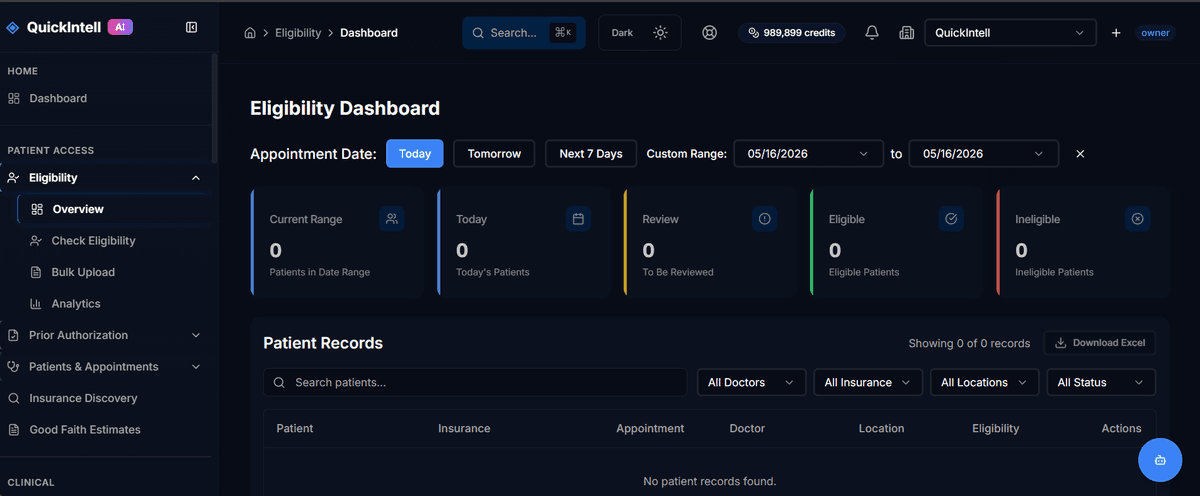
What is insurance eligibility verification?
Insurance eligibility verification is the process of confirming a patient's active health insurance coverage, benefits, co-pays, deductibles, and authorization requirements before providing medical services. Verifying eligibility before appointments prevents claim denials — insurance-related issues cause approximately 24% of all healthcare claim denials, according to the American Hospital Association. QuickIntell's AI eligibility verification checks coverage in real time across 3,500+ US payors in under 5 seconds, returning detailed benefit information including deductible status, co-insurance rates, and prior authorization requirements for specific CPT codes. The system integrates with major EHR platforms including Epic, Cerner, and Athenahealth to trigger automatic eligibility checks at the time of appointment scheduling. Bulk verification is also available to screen hundreds of upcoming appointments overnight, ensuring coverage is confirmed before patients arrive. Customers report up to 30% fewer eligibility denials and 8-12% improvement in point-of-service collections within 60-90 days of implementation.
Problem
You're stuck with manual payer lookups, unclear benefits at check-in, and avoidable claim rejections. It costs time (3–7 min per patient), money (3–5% write-offs from eligibility errors), and risk (poor patient experience & cash-flow volatility).
Solution
Here's the simple way: QuickIntell auto-verifies eligibility via 270/271 & FHIR APIs across 3,500+ payors, enriches responses with ML normalization, and surfaces patient-ready benefits—so you collect accurately up-front and submit cleaner claims.
Benefits
Real-time checks
So you can shorten intake by 2–4 minutes per patient.
Fewer denials
ML-normalized benefits & flags cut eligibility-related denials by up to 30%.
POS collections
Batch + instant recheck prevent day-of-service surprises and increase POS collections by 8–12%.
Closes the loop
Eligibility results do not stop at a green badge. They flow into the next revenue-cycle action so inactive, active, and patient-responsibility signals are handled without a second spreadsheet.
Insurance Discovery
INACTIVE patients are automatically queued into Insurance Discovery, which finds active coverage on roughly 20% of “uninsured” patients with balances over $100.
Patient AR
Copay and deductible results flow into Patient AR so check-in estimates and patient responsibility balances use the payer's current answer.
Claims
Eligibility proof attaches to encounter and claim notes, giving billers printable payer evidence before a clean claim goes out.
Good Faith Estimate
Plan and OOP data feed Good Faith Estimate workflows so self-pay and uninsured encounters keep the No Surprises Act trail aligned.
How it works (1–4)
Connect
Securely connect to payors via 270/271, FHIR Coverage/Eligibility, or clearinghouse; map to your EHR/PMS.
Configure
Set payer rules, service-line bundles (e.g., surgery, imaging), and visit-type prompts; define auto-recheck windows.
Run
Trigger real-time, pre-visit batch, or bulk re-verification; ML parses copays, coinsurance, OOP, and plan limits.
Measure
Dashboards track verification rate, exception queues, payer latency, denial reduction, and POS uplift.
What happens when something goes wrong
Failed eligibility checks stay typed and recoverable, so teams know when to retry, when to fix coverage data, and when an override needs management review.
Availity or Stedi
If one clearinghouse times out or errors, QuickIntell fails over to the other vendor before the check is treated as an operational error.
Fix the typed cause
AAA codes such as 72 Invalid Subscriber ID route staff to payer-specific guidance: compare the card, member ID, subscriber relationship, and policyholder details, then retry.
Auto-retry instead
When both Availity and Stedi fail for a payer, Schedule Auto-Retry keeps trying every 30 minutes for the next 4 hours without losing the work.
Tracked weekly
Manual OVERRIDE actions require a documented reason, are tracked weekly, and should stay under five per facility so failed checks do not become silent denials.
Feature groups
Automate
- - Real-time & batch 270/271, FHIR CoverageEligibilityRequest/Response with payer-specific throttling
- - ML normalization of 271 segments (copay/coinsurance/deductibles, limits, plan notes, PCP required)
Collaborate
- - Front-desk checklists and scripted prompts (photo ID, referral, auth)
- - Work queues for exceptions with role-based routing and @mentions
Control
- - Rules engine for visit types (e.g., MRI, E/M, surgery) and payer-specific caveats
- - Auto-recheck windows (T-72h, T-24h, day-of) with delta highlights
Report
- - KPI dashboards: verification success %, payer latency, exception aging, denial causes
- - Export & webhook to BI; audit-ready logs with full 270/271 trace
Eligibility response states
Status reference
The response viewer keeps each check in a clear state so staff know whether to wait, collect, retry, repair coverage data, or escalate an override.
| Status | What it means | What to do next |
|---|---|---|
| PENDING | Check was started but no answer has returned yet. | Wait 5-10 seconds; if still pending, check Operations > Vendor Health. |
| ACTIVE | Coverage is in effect for the service date. | Save and notify the front desk, then collect the listed copay. |
| INACTIVE | The plan has ended or is not in effect for this date. | Mark Self-Pay to trigger Insurance Discovery, or contact the patient. |
| ERROR | Transport problem, payer down, or both vendors failed. | Click Retry; if both vendors are down, click Schedule Auto-Retry. |
| STALE | The last check is older than the freshness window, defaulting to 30 days. | Multi-select stale rows and click Re-verify Selected. |
| AAA reject | The payer rejected the inquiry because of a bad ID, wrong subscriber, or related issue. | Check the AAA code, fix the Coverage record field, and click Retry. |
| OVERRIDE | Front-desk staff manually marked the patient verified despite a missing or failed check. | Document the reason; overrides are tracked weekly and should stay under five per facility. |
Source: QuickRCM User Manual section 01, Status & state reference.
Recover lost denials
When billing asks whether a patient was covered on the denied service date, the team can change the Service Date on a single eligibility check, run it for that historical date, and print the payer response for the appeal packet.
Historical eligibility is your single best weapon for overturning “no coverage” denials because it converts a dispute into a black-and-white payer record.
Appeal-ready proof
- - Set the Service Date to the denied encounter date.
- - Run the payer check as of that historical date.
- - Save and print the eligibility response for the appeal letter.
Integrations
Works with:
Epic, Cerner/Oracle, athenahealth, eClinicalWorks, OpenEMR, NextGen, AdvancedMD, DrChrono, Greenway, Veradigm, Practice Fusion; Availity, Waystar, Change/Optum, Experian Health; Stedi/EDI gateways; FHIR endpoints.
What it enables:
- - Pre-visit batch verification from the schedule (EHR)
- - POS estimate & collection prompts at check-in (PMS)
- - Auto-attach eligibility proof to encounter/claim (clearinghouse)
- - Exception webhooks to tasking/ticketing (Slack, Teams, ServiceNow)
Pricing
Starter
for solo to small clinics
- - Up to 2,000 verifications/mo
- - Real-time + daily batch, core dashboards
- - Email support, shared infrastructure
Growth
for multi-site groups
- - Up to 25,000 verifications/mo
- - Advanced rules, auto-recheck windows, exception queues
- - EHR/PMS integration pack, SSO, priority support
Scale
for enterprises & MSOs
- - Unlimited verifications (fair-use), dedicated throughput lanes
- - Custom payer routes, premium FHIR endpoints, BI exports
- - Dedicated VPC, uptime 99.95% SLA, named CSM, onboarding
Security & Compliance
Encryption
TLS 1.2+ in transit, AES-256 at rest, HSM-backed keys
Access
SSO/MFA (Okta, Azure AD), least-privilege RBAC, IP allow-listing
Audits & compliance
HIPAA BAAs, SOC 2 Type II controls, immutable audit logs, data residency options
FAQ
Typical 2–5 seconds per payer response; slower payers fall back to queued retry with alerts.
3,500+ including national, regional, TPAs; we route 270/271 or FHIR per payer capability.
Yes—pulls from your schedule to run T-72h / T-24h / day-of with delta highlights.
Yes—ML normalizes 271 text and returns human-readable flags and limits.
Items with mismatched demographics, inactive plans, or ambiguous benefits go to a work queue with payer-specific guidance.
You'll see a clear message asking you to try again later, and you can click Schedule Auto-Retry to have QuickRCM keep trying every 30 minutes. Your work isn't lost. Don't manually override — wait for the payer to come back.
Yes. Use the Service Date field on the Single Patient Eligibility Check screen. This is essential for resolving denials from old visits.
Open the patient's chart and go to the Coverage tab. Compare the member ID on file against the photo of the patient's insurance card. Fix the field on the Coverage record and save. Return to the Eligibility Detail / Response Viewer and click Retry.
Marking self-pay automatically queues this patient for the Insurance Discovery workflow, which scans for hidden coverage the patient may have forgotten about (historically surfaces active coverage on roughly 20% of "uninsured" patients with balances over $100).
Very likely—native connectors & webhooks; we also support flat-file and API bridges.
Minimum necessary: request/response, patient identifiers (hashed where possible), and audit logs with configurable retention.
Customers report up to 30% fewer eligibility denials and 8–12% POS uplift within 60–90 days.
Yes—PDF/JSON evidence is auto-attached to encounter/claim notes.
We preferentially use EDI/FHIR; for portal-only lines, we provide operational workarounds or integrate via clearinghouses.
By successful verification; retries aren't double-counted.
Typical 1–2 weeks for Starter/Growth; Scale projects include parallel payer route validation.
Where to go next
Related products
Prior Auth
Use active coverage and planned services to start authorization checks earlier.
Patient AR
Move copay, deductible, and patient responsibility data into collection workflows.
Insurance Discovery
Queue inactive and self-pay accounts for hidden coverage searches.
Claims
Attach verified payer details and eligibility proof before clean claim submission.
GFE
Use plan and out-of-pocket context to support Good Faith Estimate workflows.
Denials Management
Recover eligibility denials with historical checks and payer response evidence.