What to review in a product demo
Review a claim-readiness result, the source of each finding, the assigned reviewer, and the evidence needed to release a held claim. Then follow the approved record to the separate submission workflow.
Review claim readiness, investigate validation findings, resolve exceptions, and approve the handoff to submission. Scope the checks, staff roles, and source-system connection for your team.
Readiness checks • Reviewed exceptions • Submission handoff
Workflow illustration with sample records and findings. Request a product demo to inspect readiness checks, review controls, and release decisions.

A rejection identifies a claim that needs correction before it can proceed through the relevant processing step. A denial is an adjudication outcome. Missing or inconsistent claim information and unsupported submission requirements can produce exceptions, but the returned response determines the investigation. Claim scrubbing checks readiness before release; clearinghouse and payer acknowledgments, status inquiries, and remittances are separate evidence. Staff review corrections and preserve the original response before deciding on the next action.
Missing or inconsistent claim inputs need investigation before release.
Unassigned exceptions and unclear handoffs make follow-up harder to coordinate.
Retain the check, finding, reviewer decision, and source correction for each exception.
Receive claim inputs, apply configured checks, route findings to the responsible reviewer, and record release or hold decisions. Follow the approved claim into the separate submission and status workflow.
Define the source of each check, who reviews exceptions, how changes are approved, and where a ready claim goes next.
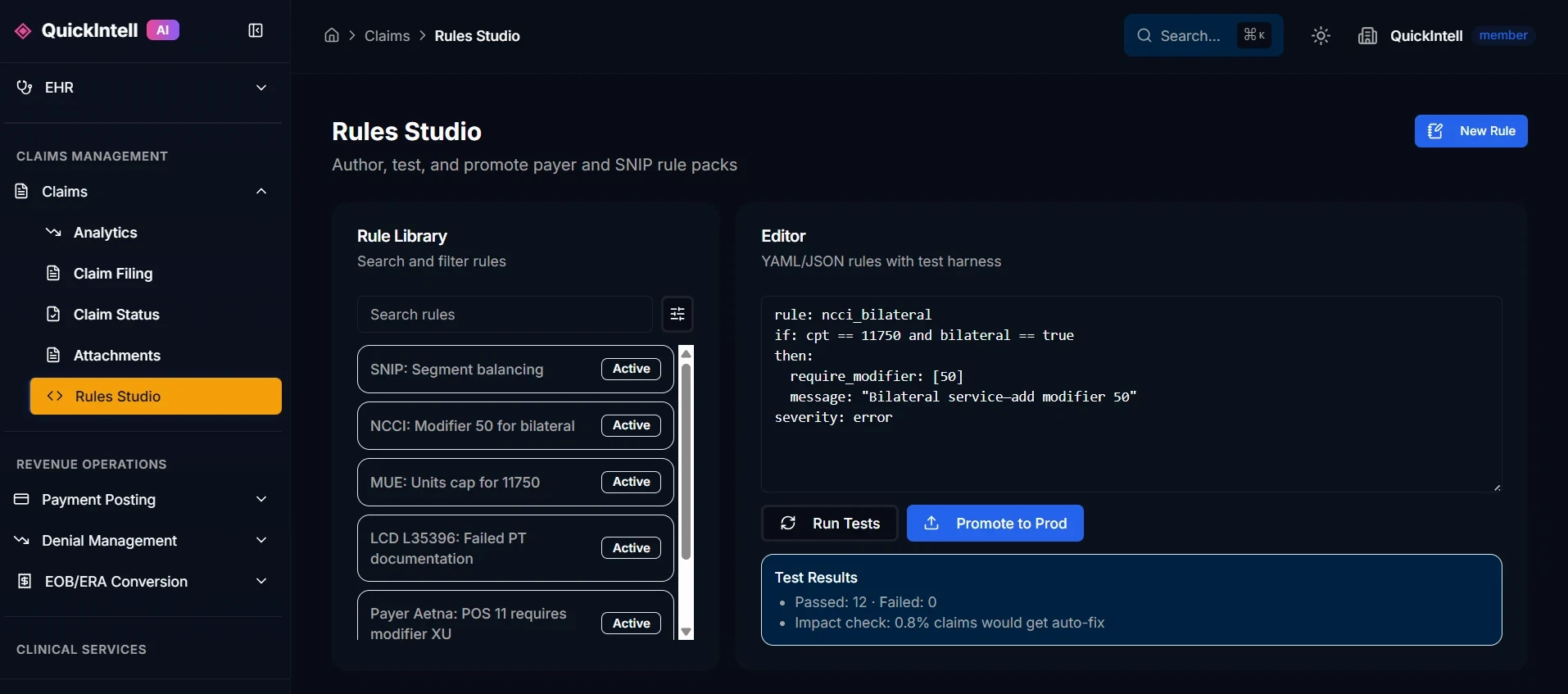
The documented Rules Studio workflow supports authorized rule authors, warning or blocking actions, simulation, reviewer approval, and promotion history. Demonstrate a representative check, inspect its source and effective context, and compare findings with staff review before release. Agree on change ownership, false-flag investigation, and rollback so a configuration issue can be corrected without hiding unresolved claims.
Review denial prevention workflowsKeep the reviewed claim, findings, supporting records, and approval history connected as the claim moves to submission. Confirm payer routes, transaction enrollment, staff permissions, and response matching for the proposed connection. Exceptions remain assigned to a reviewer; routing changes or retries need a reconciliation process that avoids duplicate submissions.
Review submission and acknowledgment handlingReview the proposed deployment architecture, approved inputs, processors, access controls, retention, logging, and agreements with your security and privacy team. Ask the demo team to show how staff inspect a finding, make a decision, and retain the relevant review history. Confirm current evidence for the actual environment and selected modules rather than relying on a past roadmap or a hosting label.
Review the trust centerScope claim inputs, source access, supported interfaces, and the connection to OpenEMR for the proposed deployment.
Define representative specialty and payer requirements, review checks, and release permissions.
Apply configured checks, investigate findings, approve corrections, and release or hold the claim with a recorded owner.
Dashboards for FPA, DSO, denial mix, payer lag, and cohort trends with drill-downs.

Track findings, confirmed issues, false flags, and staff release decisions.
Compare review time, unresolved exceptions, and approved handoff time with the same baseline.
Track acknowledgment, rejection, adjudicated denial, and payment separately after submission.
Inventory your EHR or practice management system, approved claim inputs, and available interfaces. Scope OpenEMR or another source connection, and confirm clearinghouse enrollment, resources, permissions, and response handling for the proposed deployment.
If a supported connection is unavailable, agree on an approved manual or file-based handoff and exception owner.
Use a de-identified sample to review incoming fields, configured findings, supporting records, staff correction, hold or release decisions, and the submission handoff. Ask the team to show a false flag and an unresolved exception alongside the normal workflow.
View the existing claims workflow demonstrationThe linked recording uses sample records. Evaluate the specific checks and review controls in a scrubbing-focused product demo.
The schedule depends on source access, claim samples, configured checks, reviewer roles, and integration testing. Agree on milestones, exception ownership, and acceptance criteria after discovery; no fixed pilot duration is established here.
Scope the supported claim inputs and submission handoff for your clearinghouse, transaction types, payer enrollment, and permissions. Test representative records and failure cases before activating a connection; a network name alone does not establish support.
Define who reviews findings, resolves missing information, approves overrides, and releases claims to submission. Authorized staff should be able to inspect the evidence, hold unresolved exceptions, and retain the review history.
Configured checks need a documented source, effective context, responsible owner, and review process. Test them against representative claims and investigate false flags before promotion. A payer rule set does not guarantee coverage, acceptance, or payment.
Use representative encounters, documentation, claim formats, supporting records, and payer requirements for your specialty. Agree on the checks and review responsibilities in the proposed implementation; do not assume a generic specialty package covers every case.
Forecasting is a separate evaluation scope. Review the source claim and payment data, assumptions, model availability, and comparison with actual outcomes. A readiness result or risk score is not a reimbursement prediction or payment commitment.
Scope required record types, approved access, payer submission channels, reviewer sign-off, and the evidence retained for each attachment. Confirm the handoff to submission and how missing or unmatched records stay in an exception queue.
Use a defined claim cohort and baseline. Track readiness exceptions, staff review time, false flags, release decisions, clearinghouse and payer acceptance, adjudicated denials, and later payment outcomes separately. Keep the same definitions and observation window when comparing results.
Assess permitted access and the approved submission process. Where a supported connection is unavailable, define manual work, evidence retention, and escalation ownership. Portal access or automation should not be assumed for every payer.
Review deployment-specific data flows, approved inputs, hosting, processors, access controls, retention, training policies, logging, and applicable agreements with your security and privacy team. Demonstrate the controls in the proposed environment rather than inferring them from an AI label.
Scope entity, site, provider, client, and reviewer access boundaries, plus any consolidated reporting. Test segregation and approved sharing using representative records before rollout. Confirm the reporting definitions and configuration responsibilities in the proposal.
The scrubbing workflow can be scoped alongside your existing EHR or practice management system. Confirm incoming records, validation findings, approved write-back, and the release handoff to submission. Your team remains responsible for source access and workflow acceptance.
The documented claims workflow includes Availity and Stedi routing. Confirm current supported transactions, payer routes, enrollment, permissions, and recovery behavior for your scope. Submission and status are separate from the pre-submission scrubbing workflow.
Request the current architecture and processor list for the proposed deployment, including processing regions, retention, use for training, subcontractors, and audit access. This page does not establish a universal model-provider retention or hosting guarantee.
Request current security evidence identifying the legal entity, systems, period, scope, and status of any certification or attestation. Confirm the available evidence during procurement; a previous roadmap date is not proof of completed certification.
The documented Rules Studio workflow supports authorized rule authors, warning or blocking actions, sample simulation, approval, and promotion history. Confirm the available controls in a demonstration, and agree on source review, false-flag checks, ownership, and rollback before release.
Request the fee basis, included volume, users, selected checks, integrations, onboarding, support, and third-party charges in your proposal. The package names describe evaluation scope; no fixed price or unlimited capacity is established here.
Ideal for clinics/ASCs starting automation
MSOs & mid-size RCM teams
Enterprises & BPOs
Discuss separate workflows for authorization, missing-information capture, No Surprises Act / GFE estimation, forecasting, and custom checks. Confirm availability, inputs, review ownership, and fees before adding them to the implementation.
Confirm encryption, credential storage, key ownership, and backup controls for the proposed environment.
Demonstrate the available authentication, role permissions, session controls, and provisioning process.
Review retained actions, staff and automated access, log exports, retention, and incident responsibilities.
Request current evidence for the entity, systems, scope, and period, plus the proposed BAA and processor list. Confirm certification or attestation status during review.
Billing and claim-readiness teams validating records before an approved claim is transmitted.
Review a claim-readiness result, the source of each finding, the assigned reviewer, and the evidence needed to release a held claim. Then follow the approved record to the separate submission workflow.
Confirm the source of encounter, coverage, authorization, documentation, and billing data. Establish which current payer requirements can be validated for the organization's workflow.
Staff review findings and correct supported errors. Clinical documentation and billing decisions stay with the responsible reviewers. A clean readiness check is not a coverage or payment guarantee.
Sample the main specialties and payer routes. Review exceptions and false positives, identify release controls, and reconcile the handoff to claims submission before expanding checks.
Discuss claim volume, source-system connections, supported checks, exception workflow, implementation, and support.
Use software when your staff will operate this workflow. Review managed service scope when you want Quickintell to perform the agreed work.
Book a product demo